
When you create content on your website, you have an important choice to make: should you link to other websites or keep readers only on your own pages? That decision involves external links, and getting it right can help your SEO while making your content more useful.
Many beginners worry that linking out will send visitors away or hurt their rankings. Others add too many random links and damage their credibility. In this guide, you’ll learn exactly what they are, how they affect SEO, when they help or hurt, and the best practices to follow in 2026.
By the end, you’ll feel confident using external links the smart way — to build trust, provide value, and improve your own site’s performance.
Table of Contents
What are external links?
External links are hyperlinks that point from your website to a different website or domain.
In simple terms: if you write a blog post and add a link that takes readers to another site (like Wikipedia, a tool, or a news article), that is an external link.
Example 1: You write about healthy eating and link to a study on the Harvard Health website. This helps readers find trusted medical information while showing you did proper research.
Example 2: You recommend a plugin and link directly to the official WordPress plugin page. Readers can click and install it easily, improving their experience on your site.
Example 3: You mention a statistic and link to the original government report. This adds credibility because anyone can verify the data themselves.
These links are also called outbound links because they go out from your site. They are different from internal links, which stay within your own website.
When used thoughtfully, external links make your content feel more complete and professional. Readers appreciate it when you point them to extra helpful resources, and search engines notice that too.
External links vs internal links
It’s easy to confuse external links with internal links, but they serve different purposes.
Internal links point to other pages on the same website. They help visitors navigate your site, keep people reading longer, and help search engines understand how your pages connect. For example, linking from one blog post to your homepage or to a related service page is an internal link.
External links point to pages on different websites. They show readers (and Google) that you’re willing to send people to helpful resources outside your own site. This can build trust because it shows you’re not trying to trap visitors — you’re genuinely trying to help them.
Here’s a clear comparison table for quick understanding:
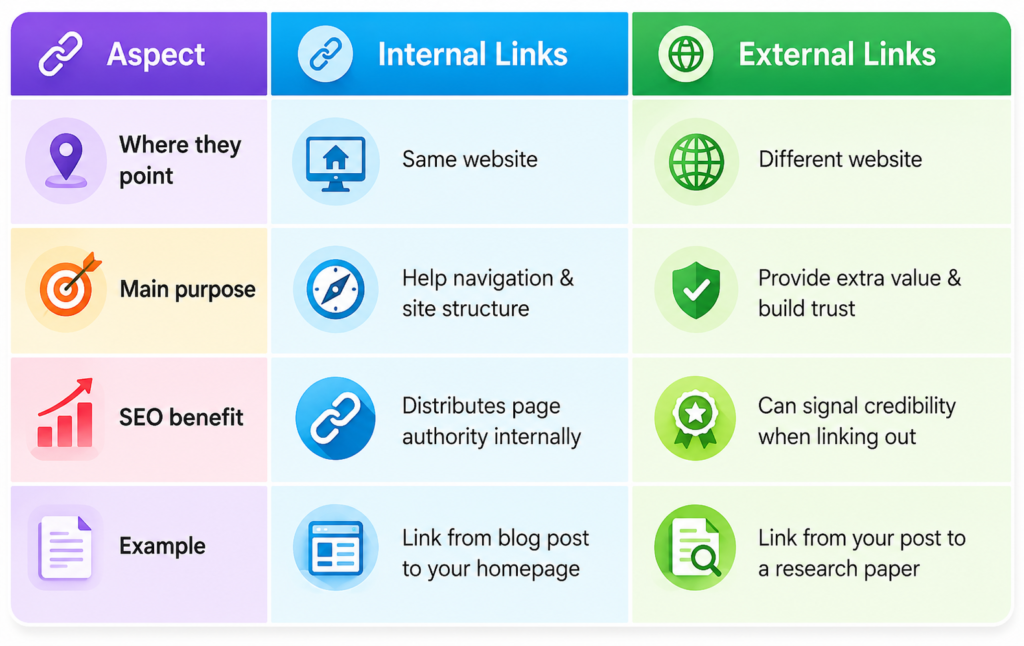
Using both types together creates a healthy linking strategy. Internal links keep people exploring your site, while well-chosen external links add value and show you’re connected to reliable information.
For beginners and bloggers, a good rule is to use more internal links than external ones on most pages. This keeps readers on your site longer while still providing helpful pointers outward when needed.
Types of external links
There are two main ways to think about external links, and both play important roles in SEO.
1. Outbound links (from your site to others)
These are the links you add yourself from your content to other websites. You have full control over them. Good outbound links point to high-quality, relevant sources and genuinely help your readers learn more or take action.
For example, if you’re writing a guide about email marketing tools, linking to the official documentation of a popular tool like Mailchimp is a helpful outbound link. It gives readers direct access to accurate instructions.
2. Inbound external links (backlinks)
These are links from other websites pointing back to your site. Backlinks are one of the strongest ranking signals in SEO because they act like votes of confidence from other sites. When a respected website links to your content, it tells Google that your page is valuable and worth showing to searchers.
Both types matter for a complete SEO strategy, but this guide focuses mostly on outbound links — the ones you can control right now as a content creator or website owner. Managing your own outbound links well can indirectly help you earn more high-quality backlinks in return.
Why external links matter for SEO
External links play several important roles in how search engines view your website.
First, they show Google that your content is well-researched and connected to the wider web. When you link to trusted sources, it signals that you’ve done your homework and aren’t just making things up.
Second, they provide real value to your readers. Instead of forcing people to search for more information themselves, you give them direct access to helpful resources. This improves time on page and reduces bounce rate — both positive signals for SEO.
Third, linking to authoritative sources can indirectly boost your own credibility and topical authority. Google sees that you’re part of a trusted ecosystem of information, which helps your site appear more reliable overall.
Well-placed external links also help search engines better understand the context of your page. They give additional clues about the topic and quality of your content.
In short, thoughtful external linking makes your content more helpful — and helpful content tends to rank better over time. It’s not about tricking the algorithm; it’s about creating a better experience for real people.
Do external links help or hurt SEO?
This is one of the most common questions beginners ask, and the answer isn’t a simple yes or no.
External links can help when you link to relevant, high-quality, trustworthy websites. It signals to Google that you’re not trying to hide information and that you’re providing a good user experience. High-quality outbound links can improve credibility, context, and overall page quality signals.
They can hurt if you link to spammy, low-quality, or completely unrelated sites. Google may see this as a sign of poor judgment or even manipulative behavior. Linking to penalized or low-trust domains can damage your own site’s reputation in the eyes of search engines.
The key is always relevance and quality. Linking to a respected industry site on the same topic usually helps. Linking to random, unrelated pages, paid link networks, or spammy directories can hurt.
In 2026, Google is even better at understanding context. A few well-chosen external links to authoritative sources often strengthen a page. Too many low-quality or irrelevant ones can weaken it.
Realistic advice for beginners: Start conservatively. Add external links only when they genuinely add value. It’s much safer to link too little than too much at first.
Best practices for using external links
Follow these simple, practical rules to use external links effectively without risking your SEO:
- Link only to authoritative and relevant sources. Always ask: Is this the best possible resource for my reader right now?
- Use natural, descriptive anchor text. Instead of “click here,” write something like “latest Google ranking factors guide” or “official Mailchimp automation documentation.”
- Don’t overdo it. Aim for 2 to 5 external links per 1,000 words as a general guideline. Quality matters far more than quantity.
- Consider opening external links in a new tab. This keeps readers from completely leaving your site while still letting them access the extra information.
- Regularly check that the linked pages are still live and relevant. Broken external links frustrate users and can hurt user experience signals.
- Diversify your outbound links over time. Don’t always link to the same few big sites — spread them across different reputable sources when appropriate.
The golden rule is simple: Always ask yourself, “Does this link genuinely help my reader understand or solve their problem?” If the honest answer is yes, add it. If you’re adding it just to add a link, skip it.
For bloggers and small business owners, this approach builds long-term trust with both readers and search engines.
How many external links should you use?
There is no perfect magic number that works for every page. It depends on the length, topic, and purpose of your content.
For a typical 1,500-word guide or blog post, 3–6 well-chosen external links are usually a safe and effective range. For shorter posts (500–800 words), 1–3 external links often feel natural.
Focus on quality over quantity every single time. A few highly relevant, authoritative links are much better than many weak or irrelevant ones.
If your page is very long and comprehensive (like an ultimate guide), you might comfortably include more — as long as every link adds real value and doesn’t distract from your main message.
Remember: Google no longer enforces a strict “100 links per page” rule like in the past. The emphasis today is on reasonableness and user experience. If your external links feel helpful rather than spammy, you’re on the right track.
Common mistakes to avoid
Here are the most frequent mistakes beginners make with external links — and how to avoid them:
- Linking to low-quality or spammy websites just to add more links. This can damage your credibility and trigger negative signals.
- Using too many external links on one page, which makes the content feel like an exit door and frustrates readers.
- Adding irrelevant links that don’t help the reader just to “improve SEO.” This almost always backfires.
- Forgetting to update old links when the destination page changes, moves, or disappears (broken links hurt user experience).
- Using generic anchor text like “click here,” “read more,” or “this site” instead of descriptive, natural phrases.
- Linking to the same external site repeatedly in one article without a good reason.
Avoiding these mistakes will protect your site’s reputation and help your pages perform better in search results.
Real examples of external links
Let’s look at concrete examples to make this practical.
Good example:
You’re writing a beginner’s guide to email marketing. In the section about automation, you link to Mailchimp’s official help article on setting up automation sequences.
Why it works: The link is highly relevant, points to an authoritative source, and genuinely helps the reader take the next step. It adds value without feeling forced.
Another good example:
In a post about healthy recipes, you mention a nutrition fact and link directly to a recent study published on the National Institutes of Health website.
Why it works: The link provides transparency and credibility. Readers can verify the information themselves.
Bad example:
You’re writing about gardening tips, and suddenly insert a link to an unrelated online casino or gambling site in the middle of the article.
Why it hurts: The link feels completely out of place and spammy. It damages trust and can send negative signals to search engines.
Another bad practice:
Filling a page with 15+ external links to random directories or low-quality affiliate sites just to “build SEO.” This often results in poor user experience and potential ranking issues.
The pattern is clear: relevant + helpful = good. Irrelevant or low-quality = bad.
External links and SEO myths
Several myths about external links still confuse many beginners.
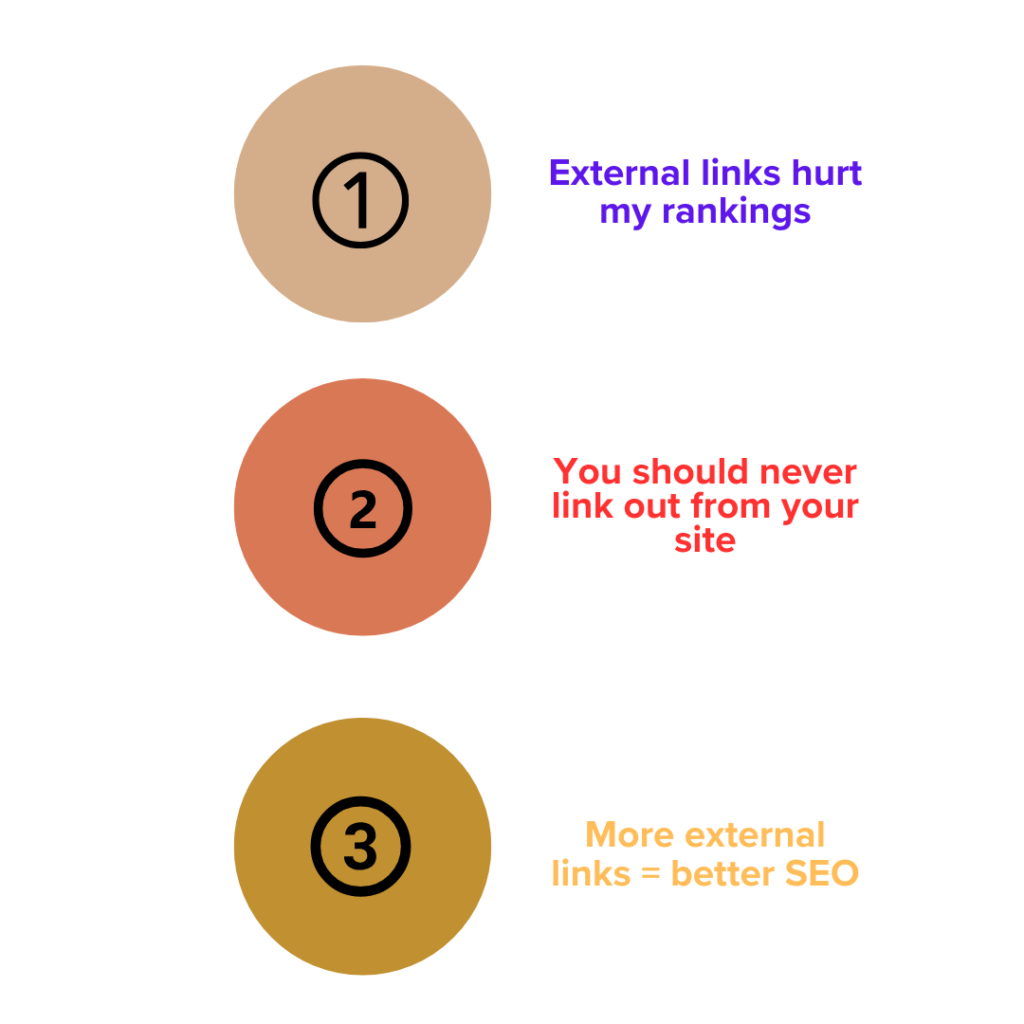
Myth 1: “External links hurt my rankings.”
Reality: High-quality outbound links usually help by improving user experience, adding context, and showing expertise. They don’t pass “link juice” away in a harmful way when done right.
Myth 2: “You should never link out from your site.”
Reality: Not linking out can make your content look incomplete or untrustworthy. Readers expect helpful resources, and Google rewards pages that satisfy intent.
Myth 3: “More external links = better SEO.”
Reality: Quality and relevance matter far more than quantity. Too many weak links can dilute your message and hurt user signals.
Understanding these realities helps you make smarter linking decisions without fear or over-optimism.
Pro tips for external links
Here are some practical pro tips to take your external linking to the next level:
- Use external links strategically to boost trust by citing reputable, up-to-date sources. This is especially powerful in how-to guides, review posts, and data-driven articles.
- Combine external links with a strong internal linking strategy. After sending a reader to a helpful external resource, bring them back with a relevant internal link to keep them exploring your site.
- Always link to the most current version of a resource. Check periodically and update old links — this shows attention to detail.
- Occasionally, place an internal link right after an external one. This gentle nudge can reduce bounce rates while still providing value.
- For bloggers and content creators, treat external links as a way to build relationships. When you link to someone’s useful content, they’re more likely to notice and potentially link back in the future.
These small habits compound over time and help your site grow sustainably.
Frequently asked questions
What is an external link?
An external link is a hyperlink that points from your website to a completely different website or domain. It takes visitors away from your site to another one.
Do external links help SEO?
Yes, when they are relevant and point to high-quality sites. They improve user experience, add credibility, and help search engines understand your content better. Poor or spammy external links can hurt.
Do external links help website grow organically ?
Yes, external links can help a website grow organically when they are relevant and high quality.
How many external links should I use?
There’s no strict rule, but 2–6 thoughtful external links per 1,000–1,500 words is a good general guideline for most blog posts and guides. Always prioritize quality and relevance over hitting a specific number.
What’s the difference between internal and external links?
Internal links connect pages within your own website and help with navigation and authority flow. External links connect your site to other websites and are mainly used to provide additional value and build trust.
Conclusion
External links are a simple but powerful part of any SEO strategy. When used correctly, they make your content more helpful, build trust with both readers and search engines, and can indirectly support better rankings.
Remember the key points from this guide: always link to relevant, high-quality sources; use natural, descriptive anchor text; keep the number reasonable; and always put your reader’s needs first. Avoid spammy, irrelevant, or low-quality links that could damage your credibility.
Start applying these ideas today. Take one of your recent articles or blog posts, review the content, and add 2–3 genuinely helpful external links where they make sense. Then check your analytics in a few weeks to see improvements in engagement.
You now have a clear, practical understanding of external links. Use them wisely and consistently, and they will become one of your strongest tools for creating better content and growing your website sustainably in 2026 and beyond.
The smartest linking strategy is the one that serves your audience first. Do that, and the SEO benefits will follow naturally.
