

Keyword research is the foundation of everything in SEO. Get this wrong, and no amount of content quality, link building, or optimization will save you. Get this right, and you unlock a predictable path to organic traffic and sustainable business growth.
Yet most marketers skip the research phase. They create content on gut feeling. They chase high-volume keywords with no commercial intent. They don’t analyze search intent. They don’t cluster keywords strategically. They wonder why their content doesn’t rank.
In 2026, keyword research has evolved beyond simple volume analysis. Modern keyword research considers search intent, AI-driven search behavior, topical authority, semantic SEO, and business value. It’s about finding the intersection of what people search for, what Google wants to rank, and what your business needs to succeed.
This ultimate keyword research checklist walks you through a proven system that works for agencies, SaaS companies, ecommerce sites, and content businesses. Follow this checklist, and you’ll have a validated keyword strategy that drives rankings and revenue.
Table of Contents
What Is a Keyword Research Checklist?
A keyword research checklist is a systematic framework that guides you through discovering, validating, and prioritizing keywords that align with your business goals and audience search behavior.
A checklist ensures consistency. It prevents mistakes. It helps teams stay aligned. Instead of everyone using different keyword selection processes, you have one proven approach that works.
For content teams, a checklist ensures every article targets keywords with proper intent analysis and difficulty assessment. For SEO strategists, it creates a repeatable system that scales. For agencies managing multiple clients, it ensures quality standards across all projects.
Before You Start Keyword Research: Preparation Phase
Most guides jump straight to keyword tools. That’s a mistake. You need context first.
Define Your Business Goals
Ask:
– What problem does your business solve?
– Who do you serve (audience profile)?
– What’s your competitive advantage?
– Are you focused on rankings, traffic, leads, or sales?
– What’s your business model (B2B, B2C, SaaS, service, ecommerce)?
Example: “We’re a B2B marketing software company. We solve email campaign management for mid-market companies. Our competitive advantage is AI-powered subject line optimization.”
Identify Your Target Audience
Ask:
– What’s their job title or role?
– What problems do they face?
– Where do they search for solutions?
– What language do they use?
– What’s their buying journey (education → consideration → decision)?
Example: “Marketing managers at 50-500 person companies. They need to manage campaigns across multiple channels. They search for ’email marketing software,’ ‘marketing automation,’ ’email campaign management.’
Understand Customer Pain Points
Ask:
– What keeps your customers awake at night?
– What problems are they actively trying to solve?
– What mistakes do they make?
– What questions do they ask before buying?
Example: “Low email open rates, difficulty managing multiple campaigns, inability to personalize at scale.”
Analyze Your Competitors
Ask:
– Who are your top 3 direct competitors?
– What keywords do they rank for?
– What content are they creating?
– Where are they weak?
Example: “Competitors rank for ‘best email marketing software’ but not ’email management tools for distributed teams.'”
The Complete Keyword Research Checklist: Step-by-Step
Follow this 10-step process to develop a comprehensive keyword strategy.
Step 1: Identify Seed Keywords
Seed keywords are broad starting points from which all other keywords flow.
How to find them:
– Brain dump: What 10-15 terms describe your business?
– Customer interviews: Ask customers how they searched for you
– Competitor analysis: What keywords do they target?
– Industry knowledge: What terminology is used in your space?
Example for project management software:
– Project management
– Team collaboration
– Task management
– Work management
– Project planning
– Resource management
Create a list of 10-20 seed keywords. These are your foundation.
Step 2: Analyze Search Intent
This is critical. High-volume keywords mean nothing if search intent doesn’t match your business.
4 Types of Search Intent:
1. Informational Intent — User wants to learn something
– Example: “how to manage projects,” “project management best practices.”
– Use for: Blog content, educational resources, top-of-funnel
2. Navigational Intent — User wants to find a specific website
– Example: “Asana,” “Monday.com login”
– Use for: Branded content (your brand vs competitors)
3. Commercial Intent — User is researching before buying
– Example: “best project management software,” “Asana vs Monday.com”
– Use for: Comparison pages, guides, reviews
4. Transactional Intent — User wants to buy
– Example: “project management software pricing,” “free project management tool.”
– Use for: Product pages, landing pages, pricing pages
Checklist: For each seed keyword, analyze search intent. Look at actual Google results. What type of content ranks? That tells you search intent.
Step 3: Check Keyword Difficulty
Not every keyword is worth targeting. Some are too competitive.
How keyword difficulty works:
– Low difficulty (1-20): Easy to rank, lower competition
– Medium difficulty (20-50): Moderate competition, realistic for established sites
– High difficulty (50-80): Very competitive, requires high authority
– Very high difficulty (80+): Enterprise-only keywords
Best practice: Start with low-to-medium difficulty keywords (20-50 range) unless you have significant domain authority.
Checklist:
– Use tools like Ahrefs and Semrush to check keyword difficulty
– Analyze actual top 10 results (domain authority, page authority, backlinks)
– Ask: “Can we realistically beat these competitors?”
Step 4: Analyze Search Volume
Volume matters, but it’s not everything.
Important concepts:
– High-volume keywords (1,000+ searches/month) are attractive but competitive
– Long-tail keywords (100-1,000 searches/month) are easier to rank for and often more specific
– Very low-volume keywords (<100 searches/month) might not justify content creation
Best practice: Look for keywords in the “sweet spot”—100-500 searches/month with medium difficulty. These convert well and are rankable.
Checklist:
– Use Google Keyword Planner, Ahrefs, and Semrush for volume data
– Remember: Search volume is estimated, not exact
– Low volume + low difficulty often beats high volume + high difficulty
Step 5: Find Long-Tail Keywords
Long-tail keywords are 3+ word phrases. They’re gold because they’re specific and less competitive.
Types of long-tail keywords:
1. Question-based: “How to X,” “What is X,” “Why should I X.”
– Example: “how to manage remote teams,” “what is project management software.”
2. Problem-solving: “X for Y,” “best X for Y.”
– Example: “project management for agencies,” “best tool for distributed teams.”
3. Comparison: “X vs Y,” “alternatives to X.”
– Example: “Asana vs Monday.com,” “Asana alternatives”
How to find them:
– Google autocomplete (start typing in search bar)
– “People also ask” section in Google results
– AnswerThePublic tool
– Ahrefs keyword explorer (use seed keywords as starting point)
Checklist:
– Find 20-50 long-tail keywords per seed keyword
– Analyze intent for each
– Keep the spreadsheet organized by intent type
Step 6: Analyze Competitor Keywords
See where competitors rank and identify gaps.
How to do competitor keyword analysis:
– Use Ahrefs or Semrush
– Input 3 top competitors
– Generate “keyword gap” report (keywords they rank for but you don’t)
– Identify low-difficulty opportunities you can attack
Real example: Your competitor ranks for “best project management software for small teams” but not “project management tools for agencies.” You find this gap and target it.
Checklist:
– Analyze 3-5 main competitors
– Find keyword gaps (they rank for, you don’t)
– Identify quick-win opportunities (medium difficulty, decent volume, high business value)
Step 7: Group Keywords by Topic Clusters
This is modern SEO. Instead of targeting individual keywords, group related keywords into clusters.
How it works:
– Pillar page: Broad, comprehensive guide (e.g., “Project Management Guide”)
– Cluster content: Supporting articles that link to pillar (e.g., “Project Management for Remote Teams,” “Project Management for Startups”)
– Internal linking: Cluster articles link to pillar, pillar links to clusters
Benefits:
– Establishes topical authority
– Improves on-page SEO through internal linking
– Captures multiple related keywords with one content strategy
Example cluster for project management:
Pillar: “Complete Project Management Guide”
– Cluster 1: “Project Management for Remote Teams”
– Cluster 2: “Project Management for Agencies”
– Cluster 3: “Project Management Best Practices”
– Cluster 4: “Project Management Software Comparison”
Checklist:
– Group keywords into 5-10 topic clusters
– Identify pillar page for each cluster
– Plan 3-5 supporting cluster articles per pillar
Step 8: Prioritize Keywords
Not all keywords deserve immediate attention. Prioritize based on impact and feasibility.
Prioritization Framework:
Scoring:
– High priority: Medium difficulty (30-50), 300+ volume, high business value
– Medium priority: Low-medium difficulty, 100-300 volume, medium business value
– Low priority: Very high difficulty or very low business value
Checklist:
– Create a prioritization table with all keywords
– Sort by priority
– Plan content calendar: Months 1-3 focus on high priority, etc.
Step 9: Map Keywords to Content Types
Different keywords need different content types.
Mapping framework:
– Informational keywords → Blog posts, guides, tutorials, educational content
– Commercial keywords → Comparison pages, review pages, buying guides
– Transactional keywords → Product pages, pricing pages, sign-up pages
– Navigational keywords → Brand content, competitor comparison (positioning pages)
Real example:
“best project management software” (commercial) → Comparison page ranking top 3 products
“How to use Asana” (informational) → Tutorial blog post
“Asana pricing” (transactional) → Product page with pricing & features
Checklist:
– Map each keyword to a content type
– Identify content gaps (keywords without content)
– Plan new content creation
Step 10: Track Keyword Performance
You’re done researching, but the work continues. Track what works.
Metrics to track monthly:
– Rankings: What position does each keyword rank?
– Click-through rate (CTR): What % of searches result in clicks to your site?
– Organic traffic: How much traffic does each keyword drive?
– Conversion rate: What % of organic traffic converts to leads/sales?
Tools:
– Google Search Console (free, shows impressions, clicks, CTR, average rank)
– Ahrefs or Semrush (rank tracking, competitive intelligence)
– Google Analytics (traffic, behavior, conversions)
Checklist:
– Set up rank tracking in Ahrefs or Semrush
– Monitor Google Search Console weekly
– Track conversions from organic traffic
– Adjust strategy quarterly based on performance
Best Keyword Research Tools: 2026
Ahrefs

Best for: Comprehensive keyword research, competitor analysis, and keyword difficulty
Strengths: Huge keyword database, reliable difficulty scores, excellent UI, keyword gap analysis
Limitations: Expensive (£99-399/month), steep learning curve
Semrush
Best for: Similar to Ahrefs, also includes content marketing and paid ads intelligence.
Strengths: Keyword research, competitor tracking, content ideas, PPC insights
Limitations: Expensive, large learning curve
Google Keyword Planner
Best for: Free keyword research, search volume estimates, competition levels
Strengths: Free, official Google data, integrates with Google Ads
Limitations: Limited data without active ad spend, less detailed than paid tools
Google Search Console
Best for: Tracking actual keyword performance on your site
Strengths: Free, shows real search data (impressions, clicks, CTR, average rank)
Limitations: Only shows data for your site, no competitive data
AnswerThePublic
Best for: Finding question-based and long-tail keywords
Strengths: Visual interface, shows common questions and prepositions (what, where, why)
Limitations: Limited data depth, free version has restrictions
Common Keyword Research Mistakes to Avoid
Mistake 1: Ignoring Search Intent
Targeting “project management software” when people are searching for “how to manage projects” wastes effort.
Solution: Always analyze search intent before targeting keywords.
Mistake 2: Targeting Only High-Volume Keywords
High-volume keywords are competitive. You’ll never rank if you only chase volume.
Solution: Build a strategy around low-to-medium difficulty keywords (20-50) with 100-500 monthly searches.
Mistake 3: Not Analyzing SERP Competition
You can’t judge competition from the difficulty score alone. Look at actual ranking pages.
Solution: Search the keyword on Google. Analyze the top 10 results. Are they stronger than you? If yes, skip it.
Mistake 4: Keyword Cannibalization
Targeting multiple similar keywords with similar content means they compete with each other.
Solution: Use topic clusters. One pillar page per topic cluster, supporting articles for long-tail variations.
Mistake 5: Ignoring Conversions
A keyword driving 1,000 monthly visitors but zero conversions is worthless.
Solution: Track which keywords actually convert. Double down on high-converting keywords.
Advanced Keyword Research Tips for 2026
Tip 1: Semantic SEO and Entity-Based Optimization
Modern SEO isn’t about exact-match keywords. It’s about entities (concepts) and semantic relationships.
What it means: Optimize for the concept, not just the phrase. If you’re writing about “project management,” naturally include related entities: tasks, teams, timeline, resources, and collaboration.
How to use it: When writing content, think about related concepts and naturally weave them in. Google understands these relationships.
Tip 2: Topical Authority Over Individual Keywords
One comprehensive resource on a topic ranks better than scattered articles.
What it means: Build authoritative clusters. Create one exceptional pillar guide, then support it with 10+ related articles, all internally linked.
How to use it: Focus on depth and comprehensiveness in a specific topic rather than chasing random keywords.
Tip 3: AI Search Behavior Changes
Google’s AI Overviews and generative search are changing keyword research.
What it means: Some queries now show AI-generated summaries instead of traditional results. The keywords that win are those with clear, extractable answers.
How to use it: Target keywords where you can provide the best answer. Optimize for featured snippets. Provide clear, structured information.
Tip 4: Programmatic SEO Opportunities
For companies with thousands of products or variations, programmatic SEO creates thousands of pages automatically.
What it means: Use templates to generate pages for product variations, locations, and comparisons. Target long-tail keywords at scale.
How to use it: Identify keyword patterns, build page templates, and generate pages programmatically.
Real Keyword Research Workflow Example: SaaS Project Management Tool
Let’s walk through a real example to make this concrete.
Business: Asana competitor (fictional company called “TaskFlow”)
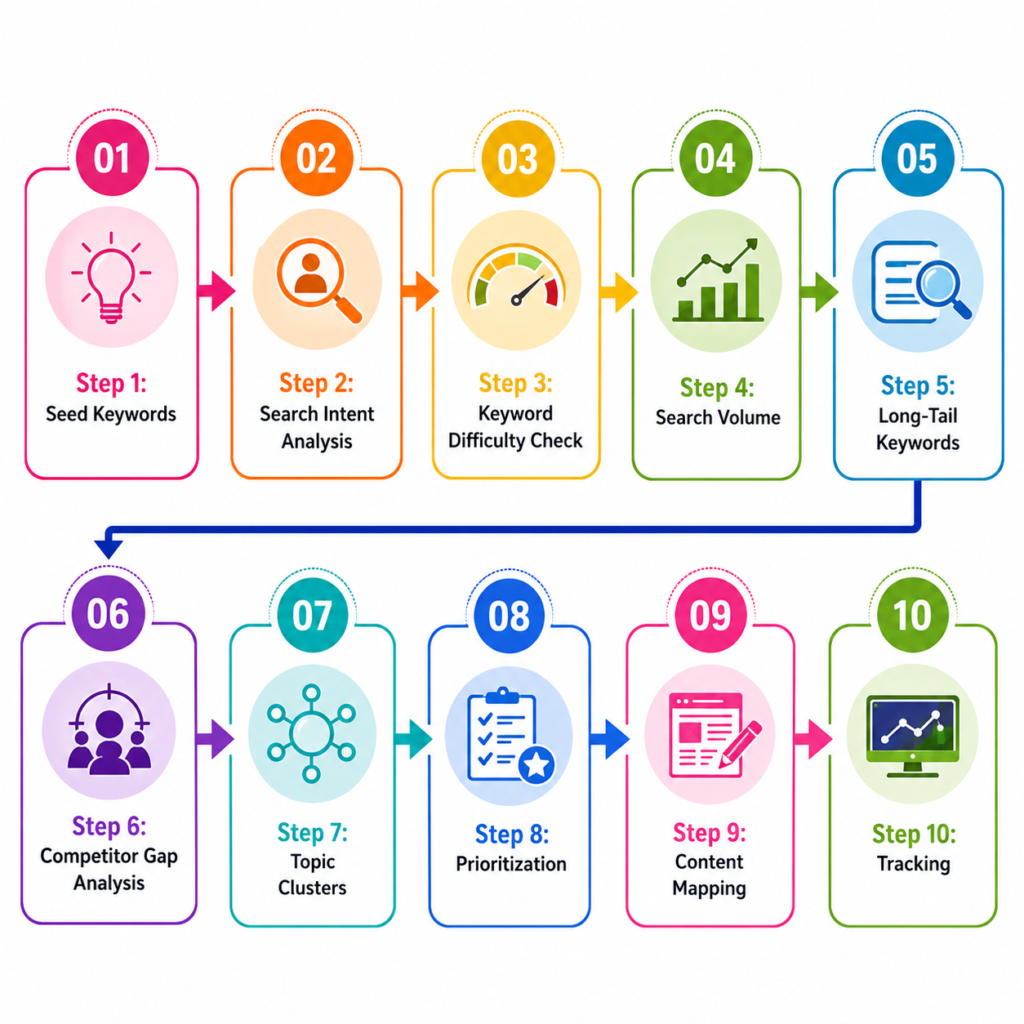
Step 1: Seed Keywords
– Project management
– Task management
– Team collaboration
– Work management
– Resource management
Step 2: Search Intent Analysis
– “project management” (informational, commercial) → high competition
– “best project management software” (commercial) → easier, high business value
– “how to manage projects” (informational) → good for blog content
Step 3: Keyword Difficulty Check
– “project management software” → difficulty 75 (too hard initially)
– “best PM tools for startups” → difficulty 35 (rankable)
– “Asana alternatives” → difficulty 45 (rankable, high intent)
Step 4: Search Volume
– “project management software” → 40,000/month (too competitive)
– “task management tool for teams” → 500/month (perfect)
– “how to track project tasks” → 200/month (perfect)
Step 5: Long-Tail Keywords
– “project management software for agencies.”
– “task management app for remote teams.”
– “best project management tools for small business.”
– “free project management software.”
Step 6: Competitor Gap Analysis
Asana ranks for: “best project management software,” “Asana vs Monday.com”
TaskFlow opportunity: “project management for distributed teams,” “task management for creative teams.”
Step 7: Topic Clusters
Pillar: “Complete Project Management Guide” (2,500 words)
– Cluster: “Project Management for Remote Teams”
– Cluster: “Project Management for Agencies”
– Cluster: “Project Management Best Practices”
– Cluster: “Project Management Software Comparison”
– Cluster: “Free Project Management Tools”
Step 8: Prioritization
High priority: “best PM tools for agencies” (difficulty 35, volume 400, high business value)
High priority: “project management for remote teams” (difficulty 30, volume 300, high business value)
Medium priority: “how to manage projects” (difficulty 20, volume 200, medium business value)
Step 9: Content Mapping
“best PM tools for agencies” → Comparison page
“project management for remote teams” → Pillar guide
“How to manage projects” → Blog post tutorial
“TaskFlow pricing” → Product page
Step 10: Tracking
Set up rank tracking in Ahrefs. Monitor Search Console weekly. Track conversions from organic traffic.
Frequently Asked Questions
What Is a Keyword Research Checklist?
A systematic framework that guides you through discovering, validating, and prioritizing keywords. It ensures consistency and prevents common mistakes.
How Do Beginners Do Keyword Research?
Start with seed keywords (10-15 terms describing your business), analyze search intent (informational vs commercial), check difficulty and volume using free tools like Google Keyword Planner, find long-tail variations, and prioritize based on difficulty vs business value.
Which Keyword Research Tool Is Best?
For comprehensive research: Ahrefs or Semrush (paid). For free: Google Keyword Planner + AnswerThePublic. For tracking: Google Search Console (free).
How Many Keywords Should I Target?
Start with 20-30 priority keywords. Build a content strategy around them. Long-term, large sites target 500-5,000+ keywords across all clusters.
What Is Keyword Intent?
The reason someone searches. Informational (wants to learn), commercial (researching purchase), transactional (ready to buy), navigational (wants a specific site).
Are Long-Tail Keywords Important?
Yes. Long-tail keywords are easier to rank for and often have higher commercial intent. They convert better than generic keywords.
How Often Should I Update My Keyword Research?
Quarterly review at a minimum. Check what’s ranking, what’s converting, and what competitors are doing. Update annually with a comprehensive research refresh.
Conclusion: Your Keyword Research Roadmap
Keyword research is the foundation of SEO success. Following this checklist ensures you’re not guessing—you’re building a strategy on data and proven methodology.
Start with this checklist. Work through each step systematically. Build your keyword strategy. Then create content targeted at those keywords with proper intent analysis, internal linking, and topical authority.
Done right, keyword research creates a repeatable machine for organic growth. You know what to create, why to create it, and what keywords it will rank for.
That’s the power of systematic keyword research.
