
Most link-building strategies have been neutered by Google updates. Guest posting farms don’t work anymore. Mass blog comment links get ignored. Paid placement feels increasingly risky.
But broken link building? It still converts. Editorial links earned. No payment. No schemes.
Here’s why: You’re solving a problem site owners didn’t even know they had. Their content links to dead pages. Visitors hit 404 errors. You show up with a solution. Everyone wins.
The key is finding the right broken links—the ones with real authority, real traffic, and real linking potential. That’s where Ahrefs comes in.
This guide walks you through using Ahrefs’ broken-link checker, finding actual opportunities, and executing a campaign that lands real backlinks. We’ll show you the exact strategies that work in 2026, common mistakes to avoid, and real-world examples.
Table of Contents
What Is a Broken Link? (Definition & Why It Matters)
A broken link is a URL that no longer works. When you click it, you get a 404 error. The page doesn’t exist.
Real example:
A site published an article about “Best Project Management Tools 2020.” They linked to a tool that shut down in 2023. Now that link is dead.
Site visitors encounter the broken link and hit a dead end. It’s a bad user experience. Google penalizes sites for broken outgoing links (slightly). The site owner probably hasn’t noticed.
Types of Broken Links
Broken backlinks: Links pointing TO your site that lead to dead pages.
Broken outgoing links: Your site’s links that point to pages that no longer exist.
For link building, we care about the second type. You find OTHER sites’ broken outgoing links and offer your content as a replacement.
The Scale of the Opportunity
Ahrefs research shows that 66% of pages on the web have at least one broken outbound link. That’s not a niche edge case. That’s massive.
Think about a popular site in your niche. It has hundreds of articles. Even if just 5% of those links are broken, that’s a significant opportunity.
What Is Broken Link Building? (The Strategy Explained)
Broken link building is a white-hat link acquisition strategy where you:
1. Find broken links on third-party websites
2. Create content that replaces what those dead links originally pointed to
3. Contact the site owner and suggest your content as a natural fix
The logic is elegant. Site owners want their content to work. When you find broken links, you’re helping them. And in return, they link to your content.
Why It Works Better Than Other Tactics
Relevance: Your link sits in existing content already aligned with your topic. Not in a guest post sidebar. Not in a directory. In a real editorial context.
Genuine: You’re not buying placement. You’re not manipulating. You’re solving a real problem.
Survival: While other tactics died in 2024-2025 updates, broken link building survived because the links it produces are genuinely editorial.
The Link Quality Question
One common misconception: broken link building produces low-quality links.
Actually, broken link building typically produces high-authority links. You’re targeting pages that already had high-quality backlinks (otherwise, why would those backlinks be pointing there?).
The difference from 5 years ago: you now face lower conversion rates. You might earn 2-3 links per 100 outreach emails in 2026, versus 5-10 per 100 five years ago. Quality increased, volume decreased.
What Is Ahrefs Broken Link Checker? (Feature Overview)
Ahrefs is an SEO tool with a large crawled database of web pages and backlink data. The “Broken Link Checker” isn’t a separate tool—it’s a feature within Ahrefs Site Explorer.
Where To Find It
1. Log into Ahrefs
2. Go to Site Explorer
3. Enter a domain
4. Click “Outgoing links.”
5. Filter for “Broken” status
This shows every broken link on that site.
Key Ahrefs Features for Broken Link Building
Site Explorer: The main interface. Enter any domain and dig into its links.
Broken Backlinks Report: Shows broken links pointing TO the site (less useful for link building).
Outgoing Broken Links: Shows broken links FROM the site pointing outward (this is what you want).
Content Explorer: Finds pages with broken links across the entire web, not just one domain.
Best by Links: Shows a site’s most-linked pages, with filters for 404 errors.
Batch Analysis: Check up to 200 URLs at once to see which have the most referring domains.
How to Find Broken Links Using Ahrefs (Step-by-Step Tutorial)
This is the critical section. Get this right, and you’ll find genuine link-building opportunities.
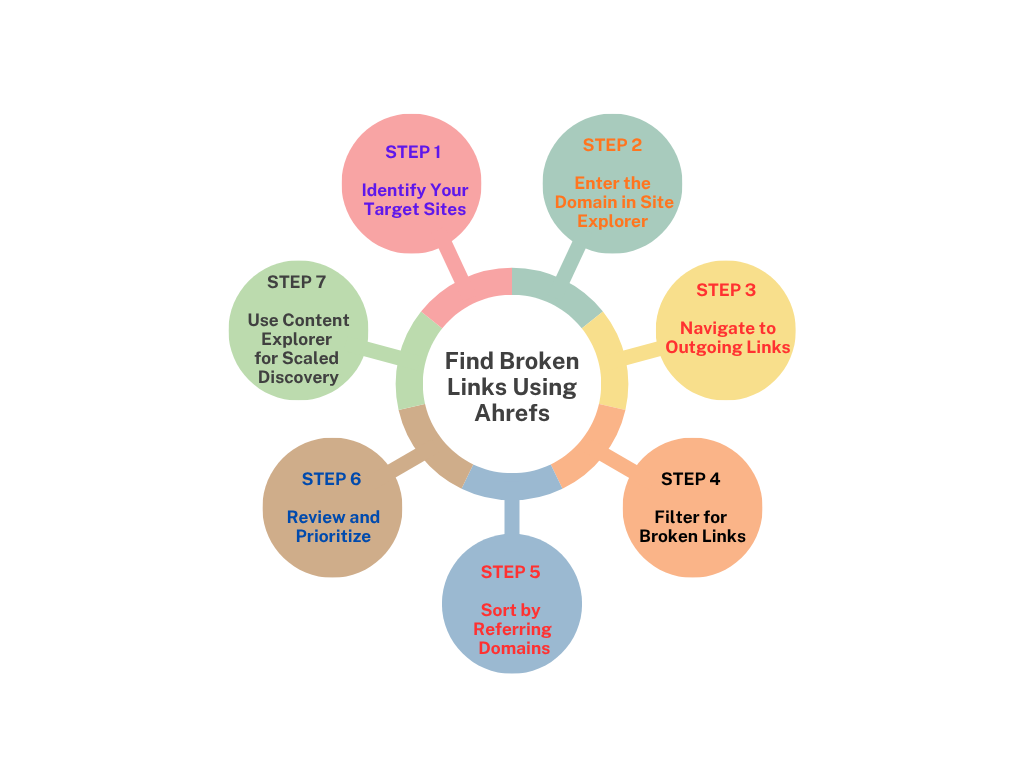
Step 1: Identify Your Target Sites
Start with sites in your niche that have authority and traffic.
Good targets:
– Competitor websites
– Industry leaders and publications
– Resource pages and directories
– Listicle sites (“Top 10” articles)
How to find them:
– Search “[Your Industry] best resources” in Google
– Look at who ranks for your target keywords
– Check competitor backlink profiles in Ahrefs
Example: If you’re in SEO, target sites like Neil Patel, Search Engine Journal, Ahrefs Blog, etc.
Step 2: Enter the Domain in Site Explorer
1. Open Ahrefs Site Explorer
2. Type the target domain (e.g., neilpatel.com)
3. Click “Explore.”
4. Wait for the crawl to complete
Step 3: Navigate to Outgoing Links
In the left sidebar, you’ll see options:
– Overview
– Backlinks
– Outgoing links ← : Click here
Click “Outgoing links.”
Step 4: Filter for Broken Links
You’ll see a table showing all external links from that site.
To filter for broken links:
1. Look for the “HTTP status” column
2. Click the filter icon
3. Select “404 Not Found” or “Other 4xx-5xx errors.”
Ahrefs will now show ONLY broken links.
Step 5: Sort by Referring Domains
This is crucial. You want broken links that have REAL backlinks pointing to them (which means the opportunity is valuable).
To sort:
1. Look for the “Referring Domains” column
2. Click to sort from highest to lowest
Now you’re seeing broken links with the most authority behind them.
Step 6: Review and Prioritize
For each broken link, ask:
– Relevance: Is this related to my niche?
– Authority: Does the linking page have real DR (40+)?
– Traffic: Does the page get meaningful traffic?
– Recency: Was this broken recently, or years ago?
Click each link to see:
– The anchor text (what the link said)
– The referring domain
– How many sites link to this broken URL
Pro tip: A broken link with 50+ referring domains is a gold mine. That means it was popular content. Site owners will value a replacement.
Step 7: Use Content Explorer for Scaled Discovery
Want to find broken links across your entire industry, not just one site?
Use Ahrefs Content Explorer:
1. Go to Content Explorer
2. Enter a broad keyword (e.g., “SEO tips,” “content marketing”)
3. Filter by “In title.”
4. Sort by “Referring domains” (highest first)
5. Manually check pages for broken links
Or use Site Explorer on multiple competitor domains and export results.
How to Do Broken Link Building with Ahrefs (Full Process)
Finding broken links is step 1. Converting them to backlinks is the whole strategy.
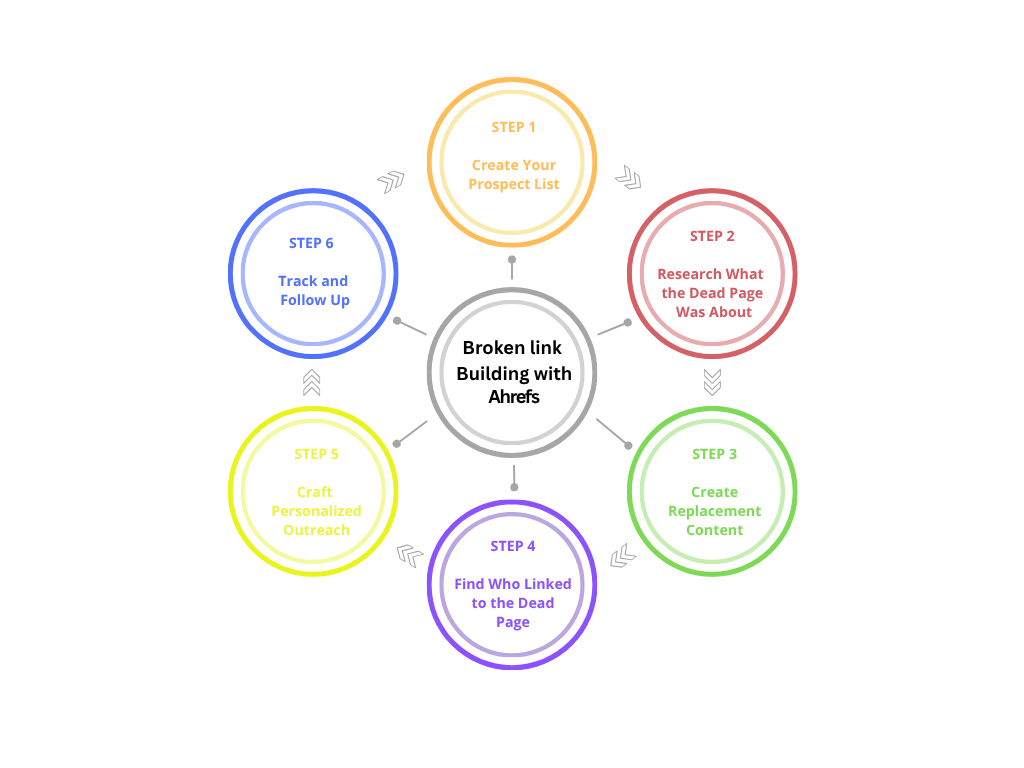
Step 1: Create Your Prospect List
Export 20-50 broken links from Ahrefs that meet your criteria:
– DR 40+
– Relevance to your niche
– 5+ referring domains pointing to them
– Recent (within last 2-3 years)
Use a spreadsheet to track:
– Broken URL
– Anchor text
– Referring domain
– Contact email
– Status (Contacted / Responded / Linked / Rejected)
Step 2: Research What the Dead Page Was About
Check the Wayback Machine (archive.org) to see what content used to be at that broken URL.
Why this matters: If you understand what the original content was, you can create an even better replacement.
Example: The broken link pointed to an article about “10 SEO Tools for 2020.” You can create “15 Best SEO Tools for 2026” (with updated data and tools).
Step 3: Create Replacement Content
This is where broken link building differs from other tactics. You can’t just link to your homepage.
Create content that:
– Covers the same topic as the original dead page
– Provides updated, better information
– Solves the same problem
– Fills the gap the dead link left
Examples:
– Dead link: “Email Marketing Statistics 2023” → Your content: “Email Marketing Statistics 2026” (with fresh data)
– Dead link: “Best WordPress Plugins for SEO” → Your content: “WordPress SEO Plugins Tested in 2026” (with screenshots and comparisons)
Step 4: Find Who Linked to the Dead Page
Now that you know which page is broken, find out WHO linked to it. These are your targets.
In Ahrefs:
1. Click on the broken URL itself
2. Ahrefs shows “Backlinks to this page.”
3. See all domains that linked to the dead content
These sites are your outreach targets. They already thought the content was good enough to link to. Now it’s broken, and you have a replacement.
Step 5: Craft Personalized Outreach
This is where most broken link builders fail. They send generic emails. Don’t.
Good outreach email structure:
1. Subject line: Mention the broken link issue
– “Broken link on your [Topic] article.”
– “404 error on [Page Title]”
2. First sentence: Lead with the problem
– “I noticed your article on [Topic] links to a dead page…”
3. Offer the solution: Your replacement content
– “I’ve created a comprehensive update on [Topic] that covers…”
4. Why they should care: Data, uniqueness, or value
– “Unlike the original, mine includes 2026 statistics…”
– “I’ve added comparison charts and downloadable templates…”
5. Call to action: Simple and clear
– “Would you consider updating that link to my resource? Happy to provide a preview first.”
6. Bonus: Offer to find other broken links on their site
– “I also noticed [2-3 other broken links]. Happy to help fix those too if you’d like.”
Example email:
Subject: Broken link on your “Best SEO Tools” article
Hi [Name],
I was reading your article on SEO tools and noticed one of your recommendations now returns a 404 error (the [Original Tool] link in paragraph 3). I’ve recently updated a comprehensive guide on the best SEO tools for 2026 that covers the essentials with current pricing and features. It includes the tools that have actually stuck around, plus some newer ones that fill gaps.
Would it make sense to update that link to my guide instead? I’m happy to send you a preview first, or let me know if there’s another angle that would be more helpful for your readers.
Also, I spotted [2-3 other broken links] on that same page if you want to address those too.
Cheers,
[Your name]
Step 6: Track and Follow Up
Not everyone responds to the first email.
– Wait 5-7 days
– Send one follow-up
– If no response after that, move on
Track everything in your spreadsheet so you don’t duplicate outreach.
Real-World Example: Broken Link Building Campaign
Let me walk you through an actual campaign to show how this works in practice.
The Opportunity
I found a broken link on a popular Digital Marketing blog. They had an article about “Email Marketing Platforms for E-commerce” from 2022. The article linked to a tool that went out of business in 2024.
Link metrics:
– 47 referring domains pointed to the dead page
– Article received ~3,000 monthly visits
– DR of the linking site: 68
– Anchor text: “best email marketing tool.”
The Research
I checked Wayback Machine. The original article reviewed email platforms like Klaviyo, Mailchimp, and Omnisend.
The Content
I created a 3,000-word comparison of “Email Marketing Platforms for E-commerce 2026,” covering:
– Updated platforms (including newer ones)
– 2026 pricing and features
– Real screenshots
– Comparison table
– Integration guide
The Outreach
I identified the 47 domains that linked to the dead page. I focused on the top 15 (those with the highest DR).
My email:
Subject: Dead link on your email marketing platforms article
Hi [Name],
I was reading your 2022 guide on email marketing platforms for e-commerce and noticed it links to a platform that shut down in 2024. A lot has changed in 2 years—new tools, new pricing, new integrations.
I’ve created an updated guide for 2026 with current platforms, plus I’ve tested each one for actual e-commerce stores. It includes comparison tables and integration guides that your readers will probably find helpful.
Would you consider updating that link? Happy to send the article over for a quick review first.
Best,
[Name]
The Results
– 15 emails sent
– 4 responses (27% response rate—much higher than average)
– 3 actually updated the link to my article
– 1 asked for more details but didn’t link
Outcome: 3 high-authority backlinks from DR 60+ sites in a single campaign.
This is why broken link building still works in 2026. The conversion rate is lower than in years past, but the quality and relevance of the links you earn are higher.
Best Strategies to Maximize Results
Strategy 1: Combine With Skyscraper Content
Don’t just match the dead content. Exceed it.
If the broken link pointed to a “Top 10” list, create a “Top 20” with more examples, updated data, and better formatting.
If the original was a basic guide, create a comprehensive 5,000-word resource.
Strategy 2: Target Resource Pages
Resource pages are intentionally curated lists of links. When a link breaks, the page owner notices faster and cares more about fixing it.
Find resource pages in your niche using:
– Google: “best resources for [your niche].”
– Ahrefs Content Explorer: Filter for pages with titles like “resources,” “tools,” “links.”
Strategy 3: Use Batch Analysis for Efficiency
Instead of checking one domain at a time, use Ahrefs Batch Analysis:
1. Compile a list of 200 broken URLs you’ve found
2. Paste into the Batch Analysis tool
3. Ahrefs shows which have the most referring domains
4. Prioritize the ones with the most link juice
This saves time and helps you focus on high-value opportunities.
Strategy 4: Offer Value Beyond the Link
In your outreach, offer to:
– Help them find other broken links on their site
– Provide updated data for their article
– Create custom content for their specific audience
This increases response rates significantly.
Strategy 5: Target Competitor Backlinks
Use Ahrefs to analyze competitor backlink profiles. Find sites linking to them for content on [Topic]. Then find broken links on those same sites related to [Topic].
You’re reverse-engineering their link-building strategy and improving on it.
Pros and Cons of Ahrefs for Broken Link Building
PROS
– Massive backlink database. Ahrefs crawls billions of pages. Their broken link data is comprehensive and accurate.
– Real-time updates. Ahrefs regularly updates its data, so you’re getting current broken link information.
– Easy filtering. Find broken links by status code, referring domains, traffic—everything you need.
– Scalability. Batch Analysis lets you process hundreds of URLs at once.
– Context data. See DR, traffic, anchor text, and referring domains all in one place.
CONS
– Paid tool. Ahrefs isn’t free. Plans start at $99/month.
– Learning curve. It’s powerful but takes time to learn all the features.
– Not 100% accurate. Ahrefs misses some broken links and sometimes flags false positives. Always verify manually.
– Competitive. Everyone using Ahrefs is finding the same obvious broken links. The lowest-hanging fruit gets targeted quickly.
Ahrefs vs Other Broken Link Checkers (Comparison)
Bottom line: Ahrefs is the industry standard for broken link building because of its accuracy and scale. If you’re serious about this tactic, it’s worth the investment.
Common Mistakes to Avoid
Mistake 1: Targeting Low-Authority Sites
A broken link on a DR 20 site isn’t worth your time. Focus on DR 40+.
Quality matters more than quantity.
Mistake 2: Generic Outreach Emails
Copy-paste emails get deleted. Personalize. Mention the specific article. Reference the broken link. Show you actually care.
Mistake 3: Not Creating Better Content
If your replacement content is mediocre, site owners won’t link. They need a reason to make the update.
Create content that’s objectively better than what was there before.
Mistake 4: Ignoring Verification
Ahrefs sometimes flags links as broken when they’re not (server-side issues, temporary downtime). Always verify manually before outreach.
Mistake 5: Mass Outreach Without Segmentation
Don’t email 500 sites with the same message. Work in batches of 15-20, personalize, monitor response rates, and refine your approach.
Quality outreach beats volume every time.
Mistake 6: Not Following Up
The first email has a ~15% response rate. The second email to non-responders has a ~5% response rate. Always send one follow-up.
Pro Tips for 2026 Success
Tip 1: Target Recent Breaks
Broken links that just broke (last 3-6 months) are better than old ones (3+ years). Site owners are more likely to fix recent breaks.
Filter by “Last seen” in Ahrefs to find recent 404s.
Tip 2: Personalize at Scale
Use mail merge tools (GMail, Lemlist, Outreach) to personalize emails while sending at scale.
Insert [Site Name], [Article Title], [Broken URL] automatically.
Tip 3: Build Relationships, Not Just Links
Treat outreach as relationship-building. If a site owner responds (even with a no), thank them. Stay in touch. You might collaborate later.
Tip 4: Use Content Upgrades
Offer downloadable templates, checklists, or data studies as part of your replacement content.
This gives site owners another reason to link—they can offer their readers a resource.
Tip 5: Diversify Your Outreach
Don’t just email. Sometimes a comment on the blog, a social media mention, or a tool announcement works better.
Show up multiple times in different contexts.
Frequently Asked Questions (FAQs)
Is Ahrefs’ broken link checker free?
No. Ahrefs requires a paid subscription starting at $99/month. There’s a 7-day trial available to test it first.
How accurate is Ahrefs for finding broken links?
Ahrefs is approximately 95% accurate. Some links may be flagged as broken due to temporary server issues. Always verify manually before outreach.
Does broken link building still work in 2026?
Yes, but with lower conversion rates than in years past. Expect 2-3 links per 100 emails in 2026, versus 5-10 per 100 in 2021. Quality of links is higher.
How many broken links should I target in a campaign?
Start with 20-50 broken links that meet your quality criteria. As you refine your approach, scale up. Don’t start with 500 low-quality links.
Can I use Ahrefs broken link checker for my own site?
Yes. Look for “Broken Backlinks” to find links pointing to your 404s. Use this to reclaim lost link equity with redirects.
What’s better: one big article or multiple small articles for broken link opportunities?
One comprehensive article covering multiple broken link topics is better. It’s a higher effort but attracts more links because it solves multiple problems at once.
How long does it take to see results from broken link building?
It depends on your outreach response rate. If you email 20 people today and 4 respond positively, you’ll see links within 2-4 weeks.
Can I automate the outreach process?
Partially. Tools like Lemlist automate sending, but personalization and follow-up should be manual. Automation with personalization converts better.
What should I do if a site owner says no?
Thank them, note it in your spreadsheet, and move on. Some sites won’t link no matter what. Focus on the ones that will.
Is broken link building considered black hat?
No. It’s a white hat. You’re not manipulating. You’re providing value and solving a problem. Google explicitly approves of it.
Conclusion
Broken link building is one of the last SEO tactics that survived 2024-2025 updates because it’s genuinely editorial.
Here’s what to remember:
Use Ahrefs to find broken links on high-authority sites in your niche. Filter for DR 40+, 5+ referring domains, and recent breaks.
Create replacement content that’s better than what was there before. Don’t just link to your homepage.
Personalize your outreach. Mention the specific broken link. Show you did research. Offer value beyond the link.
Expect 2-3 links per 100 emails. That’s the 2026 conversion rate. It’s lower than years past, but the links are higher quality.
Track everything. Use a spreadsheet to manage prospects, responses, and outcomes.
Start with 20-50 broken links, refine your process based on responses, then scale to 100+.
The businesses winning at SEO in 2026 aren’t using silver bullets. They’re using sustainable, editorial tactics like broken link building. Combined with content marketing and technical SEO, it’s enough to move rankings.
