
Your URL slug might be the smallest part of your page’s SEO strategy. But it’s one of the most overlooked.
Most website owners focus on content. They obsess over keyword placement, internal links, and page speed. The slug? It gets auto-generated and forgotten.
That’s where you’re losing ranking opportunities. A badly written slug can tank your click-through rate (CTR) by 15-30%. A well-crafted one signals relevance to both users and search engines before they even click.
This guide covers everything. You’ll learn what SEO slugs are, why they matter, how to write them, and exactly how to implement them across WordPress, Yoast, Rank Math, and Shopify. By the end, you’ll have a framework for optimizing every URL on your site.
What Is an SEO Slug? (Definition & Components Explained)
An SEO slug is the human-readable part of a URL that comes after your domain name. It identifies what the page is about in simple, searchable language.
Here’s the breakdown:
Full URL: `www.example.com/blog/seo-slug-best-practices.`
Breaking it down:
– `www.example.com` = Domain
– `/blog/` = Category path (optional)
– `seo-slug-best-practices` = The slug
The slug tells users and search engines what to expect. It’s not random letters. It’s a deliberate, keyword-focused summary of your page’s content.
Slug vs. Permalink: What’s the Difference?
People use these terms interchangeably. They shouldn’t.
Permalink = The complete URL: `www.example.com/blog/seo-slug-best-practices.`
Slug = Just the readable part: `seo-slug-best-practices.`
In WordPress, your permalink structure determines how the slug appears in the full URL. The default structure might be `/%year%/%monthnum%/%postname%`, which adds date elements to your slug. You can change this under Settings > Permalinks.
Why This Distinction Matters
WordPress auto-generates slugs from your post title. If your title is “The Complete SEO Slug Best Practices Guide for 2026,” WordPress creates: `/the-complete-seo-slug-best-practices-guide-for-2026.`
That’s 13 words. It’s bloated. It contains unnecessary stop words. It includes a date that makes it look outdated in 2027.
An optimized SEO slug strips this down to essentials: `/seo-slug-best-practices.`
That’s 3 words. Clear. Focused. Timeless.
Why SEO Slugs Matter for Rankings & Click-Through Rates
Here’s what most guides gloss over: slugs are a minor ranking factor, but they’re a major CTR factor.
Slugs as a Ranking Signal
Google has stated that URLs are a ranking factor. The question is: how much weight do they carry?
According to industry research, slugs account for less than 1% of Google’s ranking algorithm directly. But—and this is important—that’s not the whole story.
What matters is the indirect impact. A clear, keyword-focused slug:
– Helps Google understand your page’s topic quickly
– Improves crawlability and indexation speed
– Provides context that supports your content
– Strengthens relevance signals when combined with your title and H1
In competitive niches, this small advantage compounds. Over time, multiple minor optimizations (slug + title + H1 + metadata) add up to ranking improvements.
Slugs Have a Massive CTR Impact
Here’s what actually moves the needle: click-through rate.
When searchers see your result in Google, they see three things:
1. Title (60 characters)
2. Meta description (155 characters)
3. URL/slug (visible, sometimes truncated)
The slug is your third impression. It shapes trust.
Example from actual search results:
Search query: “how to optimize URL structure.”
Result A:
– URL: `www.example.com/blog/post-123-optimize`
– User reaction: “Huh? What does post-123 mean?”
Result B:
– URL: `www.example.com/seo/url-structure-optimization`
– User reaction: “Oh, this page is specifically about URL structure. I’ll click it.”
Result B gets clicked more, even if Result A ranks slightly higher. Google notices. Improved CTR signals improve rankings over time.
Data from 2025 shows that descriptive, keyword-rich slugs increase CTR by 12-18% compared to auto-generated slugs. For competitive keywords, that difference determines which result dominates.
Technical Crawlability & Indexation
Search engines read your URL structure. A well-organized slug structure with category paths helps Google understand your site hierarchy.
For example:
– `/blog/seo-slugs/` — Google knows this is a blog post about SEO slugs
– `/products/wordpress-plugins/seo/` — Google understands the product category hierarchy
This context speeds indexation and improves how your pages relate to each other.
Best Practices for Writing SEO-Friendly Slugs
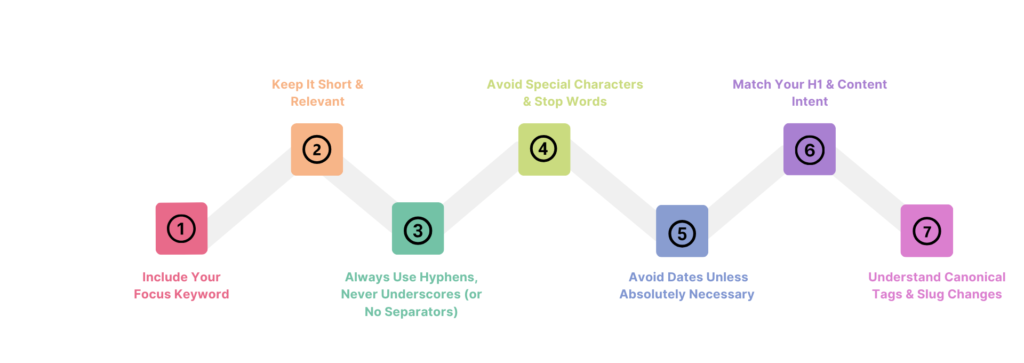
Practice 1: Include Your Focus Keyword (Naturally)
Your primary keyword belongs in your slug. Just once, naturally.
Do this:
– `/seo-slug-optimization`
– `/local-seo-services-denver`
– `/organic-coffee-subscription`
Don’t do this:
– `/seo-slug-seo-slug-optimization-seo` (keyword stuffing)
– `/seo-slug-the-definitive-2026-guide-for-optimizing-seo-slugs` (too long AND keyword stuffed)
Your keyword should be the primary topic of the slug. It shouldn’t fight for space with secondary keywords.
One keyword. One slug. That’s the rule.
Practice 2: Keep It Short & Relevant (3-6 Words)
Length matters. Long slugs are harder to read, more prone to truncation in search results, and less memorable.
Target length: 3-6 words maximum.
Good examples:
– `seo-slug-optimization` (3 words) ✓
– `local-seo-denver-services` (4 words) ✓
– `how-to-write-seo-slugs` (5 words) ✓
Bad examples:
– `the-ultimate-definitive-complete-guide-to-seo-slug-optimization-for-beginners-in-2026` (13 words) ✗
– `seo` (1 word, too generic) ✗
The sweet spot is 4-5 words. Short enough to be clean. Long enough to be specific.
Practice 3: Always Use Hyphens, Never Underscores (or No Separators)
Google treats hyphens as word separators. Underscores and spaces don’t get the same treatment.
Correct:
– `seo-slug-optimization`
Incorrect:
– `seo_slug_optimization` (underscores)
– `seoslugoptimization` (no separator)
– `seo slug optimization` (spaces, which become %20 in URLs)
Why does this matter? Google reads `seo-slug-optimization` as three separate words: “seo,” “slug,” “optimization.”
It reads `seoslugoptimization` as one word: “seoslugoptimization.”
The hyphenated version is more semantically clear to search engines.
Practice 4: Avoid Special Characters & Stop Words
Special characters break things. Stop words clutter your slug.
Remove these:
– `&, %, ?, !, *, @, #, $, ~` (special characters)
– `and, the, of, a, an, or, but, in, for` (common stop words)
Good: `/seo-slug-writing-guide.`
Bad: `/how-to-write-seo-slugs-and-boost-your-rankings-for-better-seo-results` (includes stop words “to,” “and,” “your,” “for,” “better”)
The clean version is shorter, clearer, and search engines prefer it.
Practice 5: Avoid Dates Unless Absolutely Necessary
Dates make evergreen content look stale.
Avoid:
– `/best-seo-tips-2026`
– `/wordpress-plugins-2025`
– `/digital-marketing-strategies-2024`
In 2027, `/best-seo-tips-2026` screams “outdated” even if the content is still relevant.
Use instead:
– `/best-seo-tips`
– `/wordpress-plugins`
– `/digital-marketing-strategies`
The only exception: if the date is part of the content itself (like a news article published on a specific date, or a conference happening in 2026). Even then, consider whether you’ll want to evergreen the content later.
Practice 6: Match Your H1 & Content Intent
Your slug should align with your H1 tag and the user’s search intent.
If the user searches for “how to optimize seo slugs,” they want instructions. Your slug should be `/optimize-seo-slugs` or `/how-to-optimize-seo-slugs`, not `/seo-slug-history`.
Matching example:
– Search intent: “How to optimize SEO slugs.”
– Slug: `/how-to-optimize-seo-slugs` ✓
– H1: “How to Optimize SEO Slugs for Better Rankings”
– Content: Step-by-step optimization guide
All aligned. Google’s systems recognize this coherence and rank accordingly.
Practice 7: Understand Canonical Tags & Slug Changes
If you change a slug after publishing, the old URL breaks. Old backlinks die. Old social shares lead to dead links.
Always set up a 301 redirect from the old URL to the new one.
In WordPress + Yoast SEO or Rank Math, when you change a slug, the plugins can automatically create the redirect. But verify it’s set up.
Also, if you’re using canonical tags incorrectly, your slug optimization is wasted. The canonical should point to your main version of the content, not to a different page.
Examples: Good SEO Slugs vs. Bad SEO Slugs
Let me show you 8 real-world examples and explain exactly why each works or fails.
Good Example 1: `/seo-slug-optimization`
Why it works:
– 3 words (perfect length)
– Contains primary keyword (“seo slug”)
– Clear topic immediately
– No stop words or special characters
– Scannable at a glance
Bad Example 1: `/how-to-optimize-your-website-url-slug-for-better-search-engine-rankings-in-2026.`
Why it fails:
– 15 words (way too long)
– Includes stop words: “how,” “to,” “your,” “for,” “better,” “in.”
– Includes year (makes content look dated in 2027)
– Dilutes the primary keyword
– Gets truncated in search results as: `www.example.com/how-to-optimize-your-website-url-slug-for-better…`
Good Example 2: `/local-seo-services-denver.`
Why it works:
– 4 words (optimal)
– Target keyword: “local seo services Denver.”
– Geographic specificity
– Clear intent: local services in Denver
– Easy to share and remember
Bad Example 2: `/services`
Why it fails:
– Too generic
– No keyword information
– Doesn’t tell users what services
– Low value for SEO
– Doesn’t match search intent
Good Example 3: `/wordpress-seo-plugins-2026.`
Why it works:
– 4 words
– Primary keyword: “wordpress seo plugins.”
– Clearly indicates product category
– Year added appropriately (it’s a software list that changes annually)
– Users searching “best wordpress seo plugins” will recognize this
Note: The year works here because the content IS annually updated. If you update the plugins list every year, keeping the year in the slug is fine. But if it’s evergreen, remove it.
Bad Example 3: `/wp-seo-2025.`
Why it fails:
– Abbreviations confuse users (“wp” = WordPress, but searchers see “wp”)
– Too vague
– Mixed year (not updated annually)
– Doesn’t match how users search
Good Example 4: `/organic-coffee-subscription.`
Why it works:
– 3 words
– Keyword-focused
– Clear product type
– No ambiguity
– Easy to remember and share
Bad Example 4: `/product-details-page-for-our-new-subscription-box-service.`
Why it fails:
– 10 words (excessive)
– Generic opener (“product details page”)
– Unfocused (“our new”)
– Cluttered with unnecessary words
How to Edit & Optimize Slugs in WordPress
WordPress makes slug editing straightforward, but different plugins offer different views and features.
Method 1: Default WordPress Permalink Editor
1. Go to your post or page editor
2. Look for the “Permalink” section below the title field
3. Click “Edit” next to the auto-generated slug
4. Rewrite it to your optimized version
5. Click “OK” to save
6. Publish or update the post
Important: If you’re changing an existing slug, WordPress doesn’t automatically create a redirect. You need to do this manually or use a plugin.
Method 2: Using Yoast SEO
Yoast makes slug optimization easier with built-in feedback.
1. Install and activate Yoast SEO
2. Open your post editor
3. Scroll to the “Yoast SEO” box at the bottom
4. Find the “SEO Title” section
5. Below your title, you’ll see the “Slug” field
6. Edit the slug here
7. Yoast will show a green light if your slug includes your focus keyword
8. Publish or update
Pro tip: Yoast also provides a “Readability” check for your slug, suggesting shorter versions if yours exceeds 6 words.
Method 3: Using Rank Math
Rank Math’s slug interface is equally powerful, with additional automation.
1. Install and activate Rank Math
2. Open your post editor
3. In the Rank Math metabox on the right side, scroll to “Slug.”
4. Rank Math shows your slug alongside your focus keyword in real time
5. Edit the slug directly
6. If you change the slug after publishing, Rank Math automatically creates a 301 redirect (if you have the Setting enabled)
7. Publish or update
Pro tip: Rank Math’s URL analyzer shows you competitor slugs for the same keyword, helping you position yours differently.
How to Optimize Slugs in Shopify
Shopify uses the term “handle” for slugs, but it’s the same concept.
Using Shopify’s Built-In Method
1. Go to Products or Collections
2. Click the product or collection you want to edit
3. Scroll to “Search engine listing preview.”
4. Look for the “URL and handle” field
5. Click “Edit website SEO.”
6. Edit the handle (slug) to your optimized version
7. Save
Using Yoast SEO for Shopify
If you have Yoast for Shopify installed:
1. Open the product or collection
2. Find the Yoast SEO panel
3. Edit the “Slug” field under “Search appearance.e”
4. Yoast will provide feedback on slug quality
5. Save and publish
Common SEO Slug Mistakes to Avoid
Mistake 1: Keyword Stuffing
Including your keyword multiple times in a single slug is spam.
Wrong: `/seo-slug-seo-slug-optimization-guide-for-seo-slugs.`
Right: `/seo-slug-optimization-guide.`
Google devalues this instantly. It looks unnatural, and users hate it.
Mistake 2: Slugs That Are Too Long
Lengthy slugs get truncated in search results and look messy.
Wrong: `/the-ultimate-complete-definitive-guide-to-seo-slug-optimization-and-best-practices-for-2026.`
Right: `/seo-slug-optimization-guide.`
Keep it to 3-6 words. You’ve got the H1 and meta description to explain more.
Mistake 3: Not Matching Content Intent
Your slug should reflect what users are searching for.
Wrong: Publishing a “How to Optimize Slugs” guide with the slug `/seo-slug-history.`
Right: `/how-to-optimize-seo-slugs`
When intent mismatches the slug, Google gets confused signals about what the page is about.
Mistake 4: Auto-Generated Slugs Without Edits
WordPress auto-generates slugs from titles. These are almost always too long.
Auto-generated: `/the-ultimate-definitive-complete-guide-to-writing-seo-slugs-that-rank-in-2026.`
Optimized: `/how-to-write-seo-slugs`
Spend 30 seconds optimizing it. It’s worth it.
Mistake 5: Changing Slugs Without Redirects
Changing a slug after publishing breaks backlinks and social shares.
The right way:
1. Change the slug
2. Set up a 301 redirect from the old URL to the new one
3. Update internal links
4. Update Google Search Console
Using Yoast or Rank Math: These plugins handle the redirect automatically if you have the setting enabled.
Mistake 6: Using Dates on Evergreen Content
Dates make content look stale.
Wrong: `/best-seo-tips-2025` (in 2026, this looks outdated)
Right: `/best-seo-tips` (timeless)
Exception: News articles, announcements, and annual guides that genuinely need to specify when they were published.
Mistake 7: Using Numbers That Will Change
If you publish “Top 5 WordPress Plugins” and later update it to “Top 7,” the slug becomes inaccurate.
Wrong: `/top-5-wordpress-plugins` (later updated to 7 plugins, slug misleads users)
Right: `/best-wordpress-plugins` (works for any number)
Tools to Analyze & Optimize Your Slugs
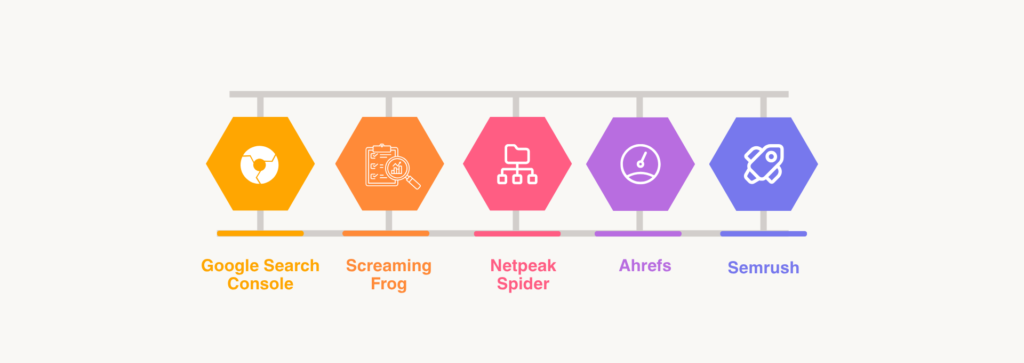
Google Search Console
Free. Essential.
Check: “Performance” > “Queries” — See which of your URLs get impressions and clicks. Use this data to understand which slugs resonate with users.
Screaming Frog
A desktop tool for crawling your entire site.
It shows: All URLs, all slugs, canonicals, redirects, and technical issues. Use the “Crawl Configuration” to check for slug inconsistencies (uppercase letters, mixed separators, special characters).
Netpeak Spider
Similar to Screaming Frog. Scans for encoded characters, special characters, and slug problems.
Specifically useful for finding: Slugs with spaces (%20), Cyrillic or non-ASCII characters, underscores mixed with hyphens.
Ahrefs
Analyze competitor slugs. See what keywords they target and how they structure URLs.
Use: “Duplicate Content” report to find multiple pages with similar content but different slugs (consolidation opportunity).
Semrush
The URL Audit feature shows slug issues across your site. Identifies: Missing slugs, too-long slugs, special character problems.
Frequently Asked Questions (FAQs)
1. What exactly is a slug in SEO?
A slug is the human-readable part of a URL after your domain. Example: In `www.example.com/seo-slug-optimization`, the slug is `seo-slug-optimization`. It identifies your page’s topic in simple language.
2. How much does a slug impact SEO rankings?
Slugs are a minor direct ranking factor (less than 1% of the algorithm), but they have a major indirect impact. They improve CTR by 12-18%, which influences rankings significantly over time.
3. Should I include my primary keyword in the slug?
Yes. Include your focus keyword naturally once in your slug. Don’t keyword stuff. One keyword, one slug, that’s the rule.
4. Can I change a slug after publishing?
Yes, but you must set up a 301 redirect from the old URL to the new one. This preserves backlink value and prevents broken links. Use Yoast SEO or Rank Math to automate this.
5. Are URLs with dates bad for SEO?
Not for news articles or annually-updated content. But for evergreen content, dates make pages look outdated. Avoid dates on evergreen slugs.
6. Should my slug match my H1 heading?
Not exactly, but they should align on the same topic. Your slug should reflect your page’s primary keyword and intent, and your H1 can expand on that. Example: Slug `/seo-slug-optimization`, H1 “How to Optimize SEO Slugs for Better Rankings.”
7. What’s the ideal length for an SEO slug?
3-6 words are ideal. Most effective slugs are 4-5 words. Shorter slugs are cleaner but might lack specificity. Longer slugs are cluttered and get truncated in search results.
8. Do slug categories impact SEO?
Yes. URL structure with categories (e.g., `/blog/seo/slug-optimization`) helps Google understand your site hierarchy and content relationships. Organize logically.
9. Can I have slugs in multiple languages on one site?
Yes, but each language should have its own slug in that language. Use hreflang tags to tell Google which version is for which language. Don’t mix languages in a single slug.
10. Should slugs have hyphens or underscores?
Always hyphens. Google treats hyphens as word separators. Underscores are ignored as separators. `/seo-slug` is better than `/seo_slug`.
11. What tools can help me analyze my site’s slugs?
Google Search Console (free), Screaming Frog, Netpeak Spider, Ahrefs, Semrush. Each offers different features for slug auditing.
12. Are emojis allowed in slugs?
Not recommended. Emojis get encoded in URLs and look messy. They also reduce readability for users. Avoid them.
13. Should I include stop words in slugs?
Rarely. Stop words (the, and, of, a, in) add length without SEO value. Remove them unless inclusion significantly improves clarity. Usually, you can remove them without confusion.
14. Are uppercase letters okay in slugs?
Technically, yes (URLs are case-insensitive for most servers). Practically, use lowercase. It’s the standard, looks cleaner, and is the WordPress default.
15. Does slug structure impact site hierarchy & crawlability?
Yes. Nested slugs with category structure (e.g., `/blog/seo/slug-optimization`) signal relationships to Google. Flat structures (all in root) offer no hierarchy signal. Nested structures help crawlability and understanding.
16. How do I change a slug in WordPress without losing SEO?
1. Change the slug in the post editor
2. Use Yoast SEO or Rank Math (auto-creates 301 redirect)
3. OR manually create a 301 redirect via your hosting or plugin
4. Update internal links pointing to the old slug
5. Monitor in Google Search Console for crawl errors
Conclusion
Your SEO slug might seem like a small detail. But when you understand its impact on CTR, rankings, and user trust, it becomes a priority.
Here’s what to remember:
Slugs improve CTR by 12-18%. Better CTR signals lead to better rankings over time.
Keep slugs short and focused. 3-6 words. Include your keyword. Remove unnecessary words.
Use hyphens, not underscores. Google treats hyphens as word separators. Underscores aren’t recognized.
Match content intent. Your slug should align with search intent and your H1. Coherence matters.
Set up redirects when changing slugs. Old backlinks and social shares die without 301 redirects. Use Yoast or Rank Math to automate this.
Optimize before publishing. It’s easier to get it right the first time than fix it later.
The best time to optimize your slugs was when you first published your content. The second-best time is today. Audit your current slugs using Google Search Console and Screaming Frog, identify the ones that need improvement, and start optimizing.
Your future rankings will thank you.
