
Backlinks remain one of the most important signals in SEO because they help search engines understand a website’s authority, relevance, and reputation. However, simply collecting backlinks is not enough. You need to know which websites link to you, what pages they link to, what anchor text they use, and whether those links are helping your SEO strategy.
That is where learning how to use Ahrefs Backlink Checker becomes valuable. Ahrefs helps you analyze your backlink profile, research competitors, find link-building opportunities, monitor lost links, and understand the quality of websites linking to your domain.
Whether you are a beginner, blogger, affiliate marketer, website owner, or SEO professional, this guide explains how to use the Ahrefs Backlink Checker step by step and, more importantly, how to turn backlink data into actionable SEO decisions.
Table of Contents
What Is Ahrefs Backlink Checker?
Ahrefs Backlink Checker is a tool that lets you examine the backlinks pointing to a website, domain, URL, or specific subsection of a website. It is closely connected to Ahrefs Site Explorer, which provides a broader view of backlink profiles, organic traffic, keywords, competitors, and website performance.
You can use it to analyze your own website or study competitors. For example, you might discover that a competitor is receiving links from industry blogs, resource pages, news websites, or niche directories that have never linked to your website.
The tool is useful for:
- Backlink analysis: Understand who links to your website.
- Competitor research: Discover where competing websites earn backlinks.
- Link-building: Find realistic websites and pages to target.
- Backlink audits: Identify unusual, irrelevant, or potentially harmful links.
- SEO monitoring: Track new and lost backlinks over time.
Ahrefs Free vs. Paid Access
The Ahrefs free backlink checker provides a limited look at backlink data. Ahrefs Free accounts can access Site Explorer data for verified websites, with limits on the amount of data visible. The free backlink checker also provides a snapshot of backlink metrics for websites.
Paid plans provide significantly broader access to backlink reports, historical data, filters, competitor analysis, exports, and other SEO tools. If you regularly perform backlink audits or competitor backlink analysis, paid access is generally more practical.
Who should use it? Anyone who wants to understand how their website earns authority online. Beginners can use it to learn SEO, while agencies and experienced marketers can use it for detailed research and link-building campaigns.
Features of Ahrefs Backlink Checker
Ahrefs includes several reports that help you understand different parts of a backlink profile.
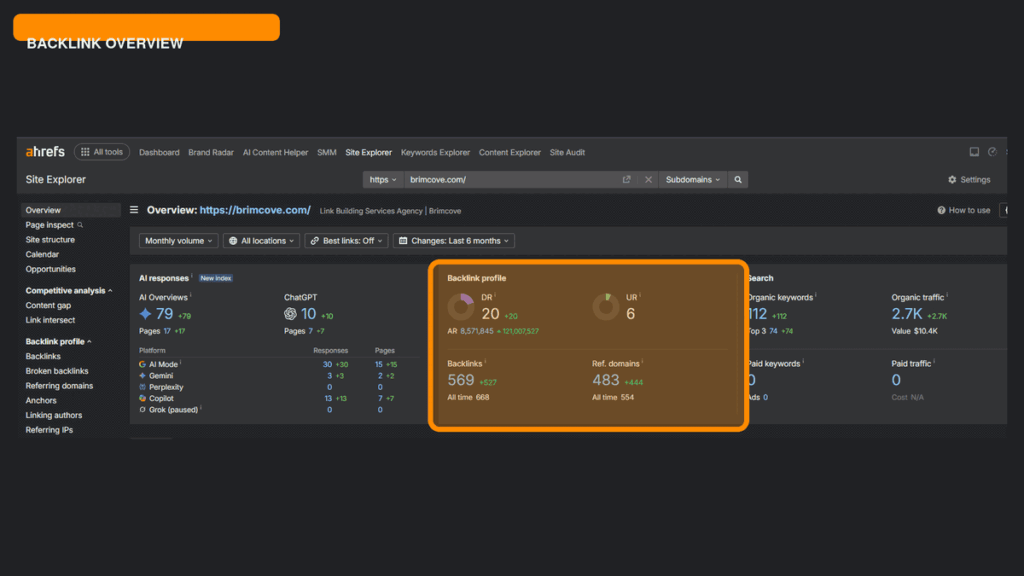
Backlink Overview provides a high-level view of the website’s backlink strength. It can show the number of backlinks, referring domains, DR, organic traffic estimates, and other important metrics.
Referring Domains shows the unique websites linking to your domain. This is important because 100 links from one website are not the same as links from 100 different relevant websites.
Domain Rating (DR) measures the strength of a website’s backlink profile on a 0–100 scale. A higher DR generally indicates a stronger backlink profile, although DR is an Ahrefs metric and should not be treated as a direct Google ranking score.
URL Rating (UR) measures the strength of an individual page’s link profile. A website may have a high DR while a particular page has a relatively low UR.
Anchor Text Report shows the words and phrases used in links pointing to your website. This helps you identify whether your backlink profile looks natural or overly focused on exact-match keywords.
New & Lost Backlinks helps you track links that have recently appeared or disappeared. Lost links can reveal broken pages, removed mentions, expired partnerships, or changes made by referring websites.
Link Type allows you to distinguish between dofollow, nofollow, sponsored, and other link attributes. Dofollow links can pass link equity, while nofollow and other attributes may still generate referral traffic, visibility, and brand exposure.
Broken Backlinks identify links pointing to pages that no longer work correctly. These can create opportunities for link reclamation if you restore the page or redirect it to a relevant replacement.
How To Use Ahrefs Backlink Checker Step-by-Step
If you are new to backlink analysis, follow this workflow.
Step 1: Open Ahrefs Backlink Checker or Site Explorer
Ahrefs offers two ways to check backlinks: the free Backlink Checker and the more detailed paid Site Explorer. Choose the option that matches the depth of analysis you need.
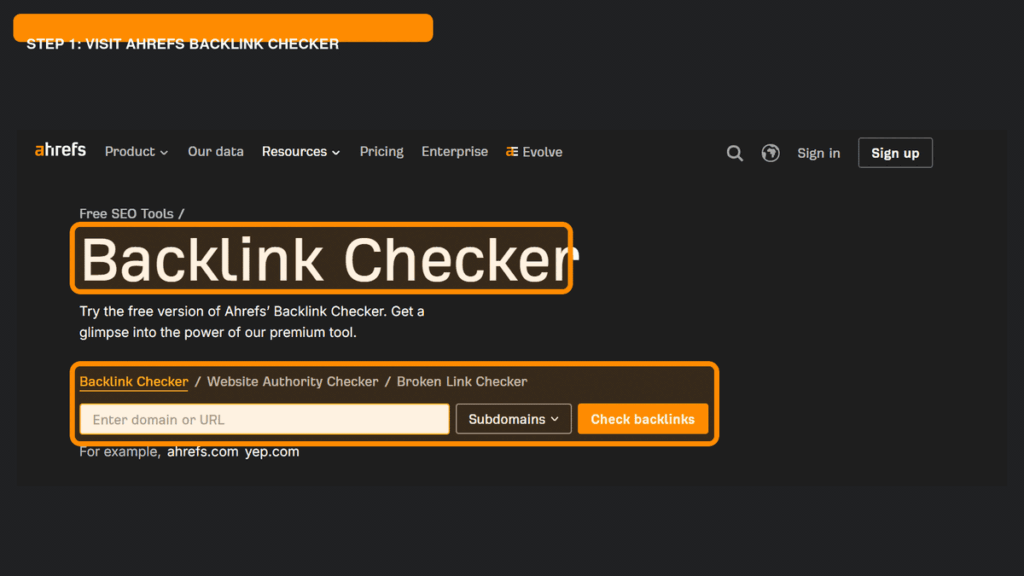
Free Backlink Checker: For a quick backlink check, open Ahrefs’ free Backlink Checker, enter the domain or URL, select the preferred scope, and click Check backlinks. This provides a limited overview without requiring a paid subscription.
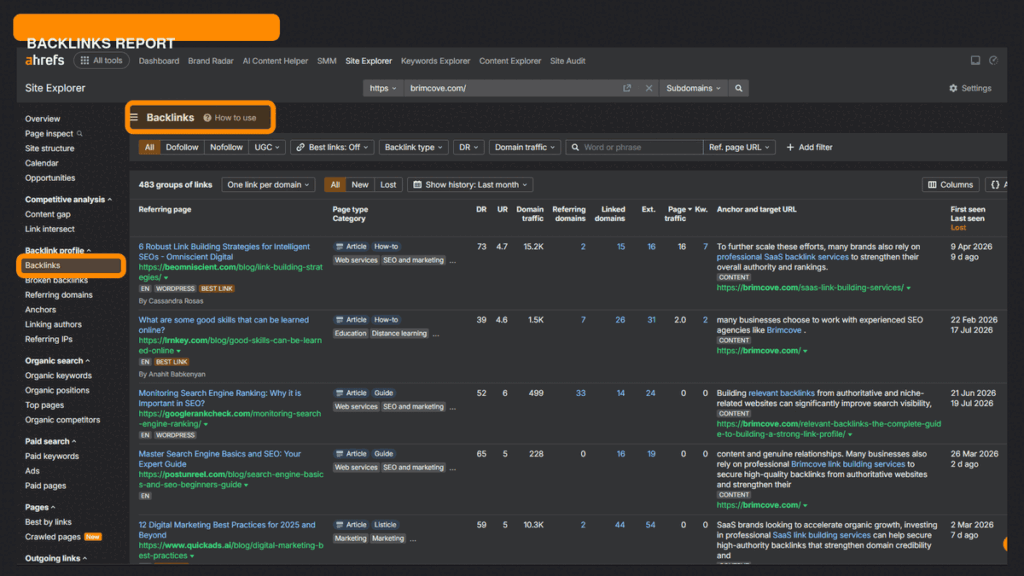
Paid Site Explorer: For a complete backlink analysis, log in to Ahrefs and open Site Explorer. Enter the website, run the search, and review the Backlink profile section on the Overview page. You can then click Backlinks in the left-hand menu to examine individual links, referring pages, anchor text, link attributes, and other available data.
The free tool is suitable for a quick check, while Site Explorer provides more comprehensive data, filters, and reporting options for detailed website or competitor analysis.
Step 2: Enter Your Domain or URL
Enter your domain, subdomain, URL, or a specific website section.
Your selection matters:
- Domain: Analyze the entire website.
- Subdomain: Analyze a specific subdomain.
- URL: Analyze one page.
- Prefix: Analyze pages within a specific folder or path.
For a complete backlink audit, start with the domain. If you are investigating why one blog post ranks well, analyze the individual URL.
Step 3: Review the Backlink Summary
Start with the overview instead of immediately opening individual backlinks.
Look at:
- Total backlinks
- Referring domains
- Domain Rating
- URL Rating
- New and lost referring domains
- Organic traffic trends
The goal is to understand the overall condition of your backlink profile.
For example, a website may have 5,000 backlinks but only 40 referring domains. This could mean that most links come from a small number of websites. Another website may have 500 backlinks from 250 unique domains, which could represent a more diverse profile.
Do not assume that a larger backlink number automatically means better SEO.
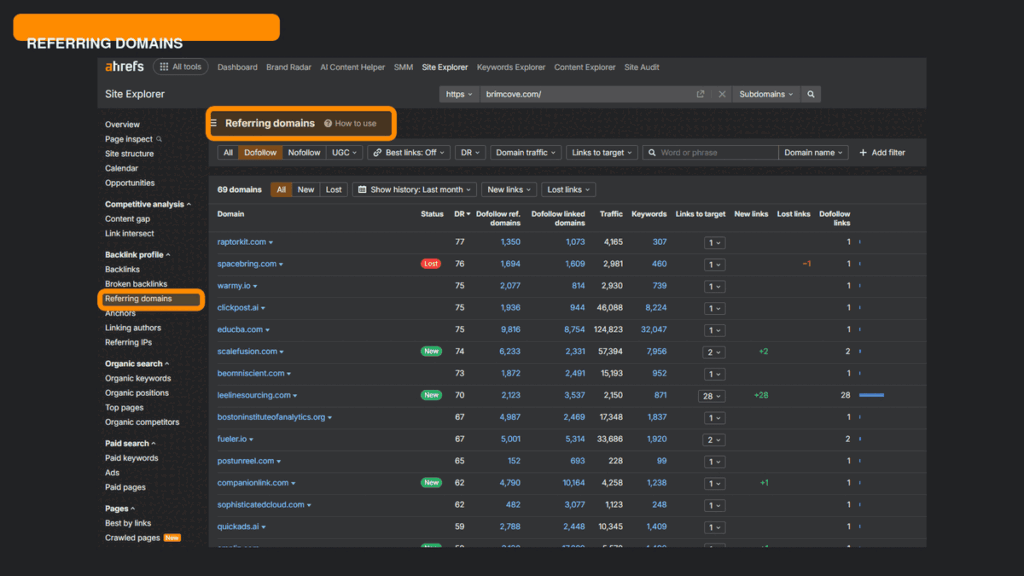
Step 4: Analyze Referring Domains
Open the Referring Domains report and examine the websites linking to you.
Prioritize:
- Relevant websites
- Websites with real organic traffic
- Strong and established domains
- Industry publications
- Websites linking to competitors but not to you
You can sort and filter the report to identify the most valuable referring domains.
Practical example: Suppose you operate a digital marketing blog. A backlink from a relevant marketing publication with real readers may be more valuable than dozens of links from unrelated websites with no meaningful traffic.
Step 5: Check Anchor Text
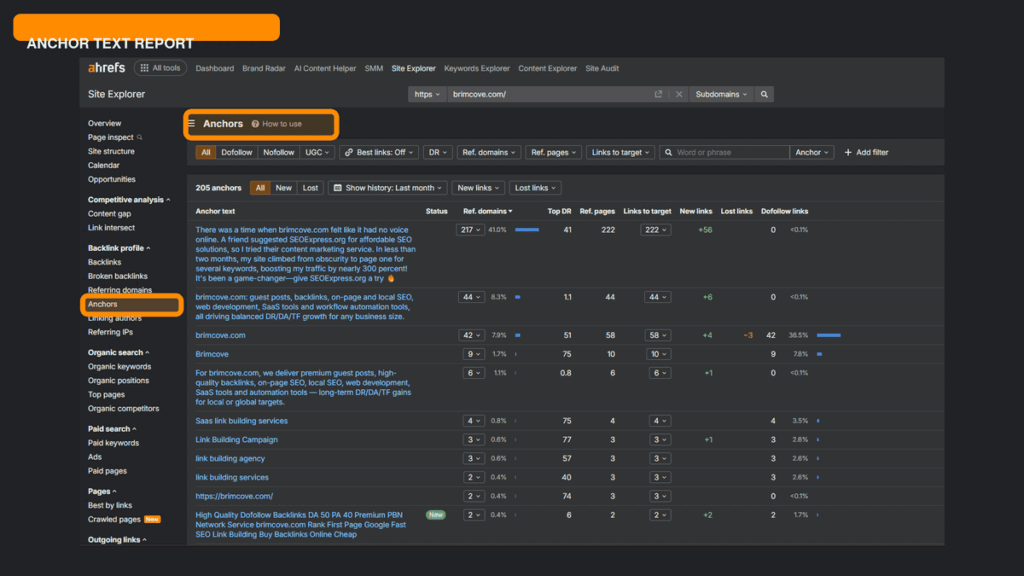
Next, review the Anchor Text report.
Look for a healthy mixture of:
- Brand names
- Naked URLs
- Natural phrases
- Partial-match keywords
- Exact-match keywords
If almost every backlink uses the same commercial keyword, your profile may appear overly optimized.
For example, a natural profile might include anchors such as:
- Brand Name
- brandname.com
- Read the full guide
- SEO resources
- best SEO tools
A less natural profile might use the same keyword repeatedly across dozens of unrelated websites.
Step 6: Review New and Lost Backlinks
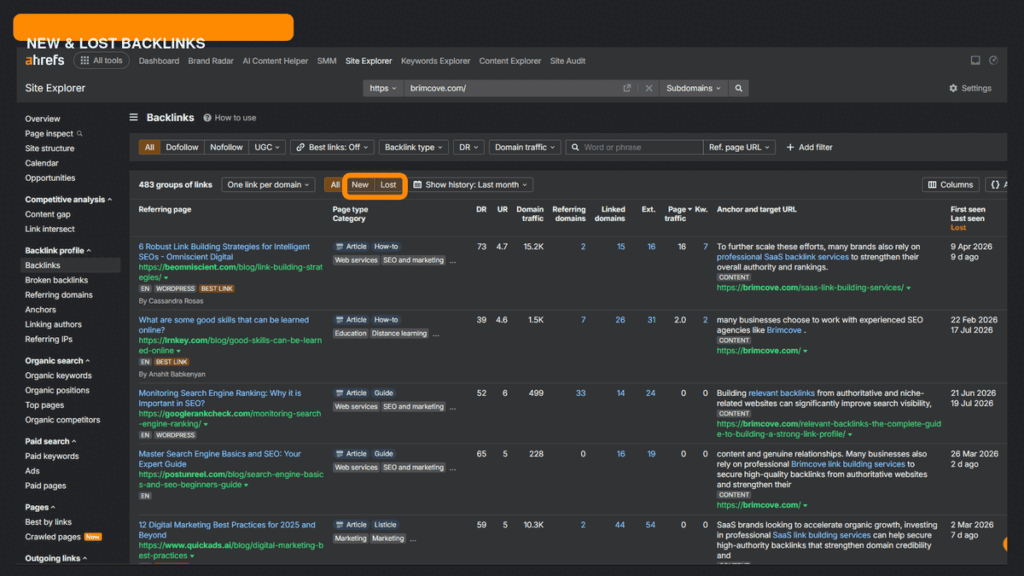
Look at recent changes in your backlink profile.
New backlinks can show which content is attracting attention and which link-building campaigns are working.
Lost backlinks can reveal:
- A page was deleted
- A backlink was removed
- A website changed its content
- A page was redirected
- Your page returned an error
If an important backlink is lost, investigate whether you can reclaim it. You might contact the website owner, fix a broken destination page, or create a more useful replacement resource.
Step 7: Export Backlink Data
For larger audits, export relevant backlink data and organize it in a spreadsheet.
Useful columns include:
- Referring domain
- Referring page
- Target URL
- Anchor text
- DR
- UR
- Organic traffic
- Link type
- Status
- Action required
This makes it easier to classify backlinks and create a link-building action plan.
Step 8: Take Action
Data is only useful when it leads to decisions.
After analyzing your backlink profile, decide whether you should:
- Reclaim lost backlinks
- Build relationships with relevant referring domains
- Create better content
- Improve internal linking
- Replicate competitor link opportunities
- Investigate suspicious patterns
- Launch a guest posting campaign
The goal is not to collect screenshots of backlink data. The goal is to improve your SEO strategy.
Understanding Important Backlink Metrics
Understanding the difference between Ahrefs metrics prevents common SEO mistakes.
| Metric | What It Means | How to Use It |
| Domain Rating (DR) | Strength of a domain’s backlink profile | Compare overall domain authority |
| URL Rating (UR) | Strength of a specific page’s link profile | Evaluate the authority of individual pages |
| Referring Domains | Unique websites linking to your site | Measure backlink diversity |
| Total Backlinks | Total discovered links pointing to your site | Understand link volume |
| Dofollow Links | Links that can pass link equity | Evaluate SEO value alongside relevance |
| Nofollow Links | Links with a nofollow attribute | Consider traffic, visibility, and brand value |
| Anchor Text | Clickable words used in backlinks | Analyze relevance and optimization |
| Broken Backlinks | Links pointing to unavailable or problematic pages | Find reclamation opportunities |
DR vs. UR
DR is a domain-level metric. It reflects the strength of a website’s overall backlink profile.
UR is a page-level metric. It evaluates the backlink strength of a specific URL.
For example, a large website may have a DR of 80, but a newly published blog post on that domain may have a UR of 5. The domain is powerful, but the individual page has not yet earned many links.
Use DR to evaluate the overall strength of a referring domain and UR to understand the strength of the specific page linking to you.
Important: Neither DR nor UR is a Google ranking score. They are third-party SEO metrics that help you compare backlink strength.
How To Analyze Competitor Backlinks
Competitor backlink analysis is one of the most useful ways to use Ahrefs.
Start by entering a competing website into Ahrefs Site Explorer. Then open its backlink reports and look for patterns.
Identify high-authority referring domains. Find websites linking to your competitors that could also be relevant to your business.
Analyze anchor text. Look at how competitors earn links. Are they being mentioned through brand names, research studies, statistics, guides, or product pages?
Find link gaps. Compare your backlink profile with competitors. If several relevant websites link to three competitors but not to you, those websites may be strong prospects.
Discover guest posting opportunities. If competitors have backlinks from relevant websites that publish expert contributions, those websites may be potential guest posting prospects. However, prioritize genuine editorial value rather than submitting low-quality articles solely to obtain links.
Study the content being linked to. This is often more valuable than simply copying a list of websites. Ask:
- What type of content earned the link?
- Was it original research?
- A detailed guide?
- A useful tool?
- A data study?
- A visual asset?
Then create something genuinely better or more useful.
How To Find Toxic Backlinks
Not every low-quality backlink is automatically dangerous. Websites naturally attract random links, spam, scraper links, and irrelevant mentions.
Potential warning signs include:
- Spammy or hacked websites
- Irrelevant domains
- Link farms and private blog networks
- Large numbers of suspicious sitewide links
- Adult, casino, or pharmaceutical spam
- Excessive exact-match commercial anchor text
- Links created solely to manipulate rankings
However, do not remove or disavow links simply because they have a low DR. A low-authority website is not automatically toxic.
Google’s systems often ignore many low-quality or spammy links automatically. The disavow tool should generally be considered carefully, particularly when there is a clear pattern of unnatural links that you or someone working on your website created to manipulate rankings.
A practical backlink audit process:
- Export suspicious backlinks.
- Review the referring domain and linking page.
- Check relevance and context.
- Look for patterns rather than judging one link in isolation.
- Identify whether the links were intentionally built.
- Take corrective action only when there is a genuine reason.
Best Ways To Use Ahrefs Backlink Checker
The tool becomes much more useful when you connect its data to specific SEO activities.
Backlink audits: Review your backlink profile regularly to understand growth, quality, relevance, and unusual patterns.
Competitor research: Identify websites linking to competitors and look for realistic opportunities.
Guest post prospecting: Find relevant websites that publish content in your industry. Evaluate relevance, organic traffic, editorial quality, and link placement before reaching out.
Broken link building: Find broken pages with backlinks and create a useful replacement resource.
Monitoring new backlinks: Identify which content is naturally attracting links and use those insights to improve your content strategy.
Recovering lost backlinks: Investigate valuable links that disappeared and attempt to reclaim them.
Tracking SEO campaigns: Compare backlink growth with your outreach and content campaigns. This helps you determine whether your link-building efforts are producing meaningful results.
Tip: Do not measure a link-building campaign only by the number of links gained. Also consider referring-domain quality, relevance, organic traffic, target-page performance, and conversions.
Common Mistakes When Analyzing Backlinks
Looking only at DR: A high DR does not guarantee that a backlink is relevant or valuable.
Ignoring relevance: A relevant link from a smaller website may be more useful than an unrelated link from a powerful domain.
Ignoring anchor text: Repeated commercial anchor text can reveal an unnatural backlink strategy.
Chasing backlink quantity: Thousands of low-quality links are not necessarily better than a smaller number of relevant editorial links.
Not monitoring lost backlinks: Losing an important backlink can affect a page’s authority and may indicate a technical or content problem.
Treating every low-quality link as toxic: Many spammy links are simply ignored by Google’s systems. Analyze patterns before taking action.
Ahrefs Free vs. Paid
| Feature | Free | Paid |
| Basic backlink checking | Limited access | Extensive access |
| Own verified websites | Yes | Yes |
| Competitor analysis | Limited | Comprehensive |
| Backlink reports | Limited data | Larger datasets |
| Historical data | Limited | More extensive |
| Filters | Basic/limited | Advanced |
| Data exports | Limited | More options |
| Link-building research | Basic | Advanced |
| Other SEO tools | Limited access | Full plan access |
Ahrefs Free is useful for website owners who want to monitor their own verified websites and learn the basics of backlink analysis. Paid plans are more suitable for agencies, SEO professionals, and businesses conducting regular competitor research and large-scale link-building campaigns.
Alternatives to Ahrefs Backlink Checker
Google Search Console is free and useful for monitoring links Google associates with your own website. It is best for first-party website monitoring but does not provide the same level of competitor backlink research.
Semrush offers extensive backlink analysis alongside keyword research, competitor analysis, rank tracking, and other marketing tools. It is a strong all-in-one alternative.
Moz is known for its Domain Authority metric and Link Explorer. It can be useful for marketers who want a straightforward backlink analysis experience.
Majestic focuses heavily on link intelligence and provides metrics such as Trust Flow and Citation Flow. It is particularly useful for users who want a backlink-focused tool.
SE Ranking combines backlink checking with rank tracking, competitor research, website auditing, and other SEO features. It can be a practical option for smaller teams and agencies.
The best choice depends on your budget, workflow, database needs, and whether backlink analysis is your primary requirement.
Best Practices for Backlink Analysis
- Monitor your backlink profile at least monthly.
- Prioritize relevant websites over high metrics alone.
- Build a natural and diverse anchor text profile.
- Focus on quality and context instead of backlink quantity.
- Review new and lost backlinks regularly.
- Investigate suspicious patterns instead of panicking over individual spam links.
- Study competitor link sources for ideas, not blind copying.
- Track which content attracts the most valuable backlinks.
- Combine backlink data with organic traffic and ranking data.
- Keep records of outreach, acquired links, and lost links.
For businesses that need professional support, a structured backlink audit can help identify opportunities and weaknesses before launching a new link-building campaign. Internal resources such as Link Building Services, Guest Posting Services, SEO Services, and Technical SEO guides can also help readers move from research to implementation.
Frequently Asked Questions
Is Ahrefs Backlink Checker free?
Yes. Ahrefs offers free backlink-checking options, although access and data limits depend on the specific free tool or account. Verified website owners can access additional Site Explorer data through Ahrefs Free, while paid plans provide broader reports and features.
How accurate is Ahrefs Backlink Checker?
Ahrefs maintains a large backlink database and regularly crawls the web. However, no backlink tool discovers every link on the internet. Different tools may report different backlink numbers because they use different crawlers, indexes, and data-processing systems.
Can I check competitor backlinks with Ahrefs?
Yes. Ahrefs is widely used for competitor backlink analysis. Enter a competitor’s domain into Site Explorer to examine its referring domains, backlinks, anchor text, and link opportunities. Access to competitor data depends on your account and plan.
What is Domain Rating in Ahrefs?
Domain Rating, or DR, is an Ahrefs metric that estimates the strength of a website’s backlink profile on a 0–100 scale. It is useful for comparison but is not an official Google ranking score.
How often does Ahrefs update backlinks?
Ahrefs continuously crawls and updates its backlink database. The timing of updates can vary depending on the website, page, and type of backlink. Recent backlink data may not appear immediately after a link is published.
How many backlinks are enough for SEO?
There is no universal number. The right number depends on your industry, competitors, content quality, search intent, and the strength of competing pages. A small number of highly relevant backlinks can be more valuable than hundreds of low-quality links.
Does Ahrefs show lost backlinks?
Yes. Ahrefs provides reports that help you identify lost backlinks and referring domains. You can investigate why a link disappeared and determine whether it is worth reclaiming.
What’s the difference between DR and UR?
DR measures the strength of a domain’s overall backlink profile. UR measures the strength of a specific URL’s backlink profile. A website can have a high DR while an individual page on that website has a low UR.
Are all low-DR backlinks bad?
No. A low DR does not automatically mean a website is harmful. Relevance, editorial context, organic traffic, and the overall quality of the website are also important.
Should I disavow every spam backlink?
No. Google often ignores many low-quality or spammy links automatically. Disavowal should be considered carefully when there is a clear and significant pattern of unnatural links, especially links created to manipulate search rankings.
Conclusion
Learning how to use Ahrefs Backlink Checker is about more than counting backlinks. The real value comes from understanding the websites linking to you, identifying valuable referring domains, analyzing anchor text, monitoring lost links, and studying competitor strategies.
Start with your backlink overview, then examine referring domains, link quality, anchor text, new and lost links, and broken backlinks. Use these insights to improve your content, recover valuable links, identify realistic outreach opportunities, and build a stronger backlink profile.
Remember that SEO success does not come from chasing the highest DR or the largest backlink count. Focus on relevance, quality, diversity, and sustainable link-building practices.
If you need help analyzing your backlink profile or building high-quality links, explore BrimCove’s link-building and SEO services to develop a data-driven strategy that supports long-term organic growth.
