
A hidden link is any hyperlink that is deliberately concealed from human visitors but remains fully visible and followable to search engine crawlers. The intent is usually manipulative: pass link equity without users noticing, or (more commonly now) inject spam links via compromise.
Hidden links differ from hidden text (which hides keyword-stuffed content for ranking manipulation). Both fall under the same Google spam category, but hidden links specifically involve tags that are invisible or inaccessible to users.
Historically (2000s–early 2010s), SEOs used them to stuff exact-match anchors invisibly, hoping to boost rankings without ruining user experience. Google stopped passing meaningful value from these years ago, but the technique persists—mostly via hacks.
Table of Contents
Types of Hidden Links (With Real Examples)
Here are the most common methods we still encounter in audits:
- CSS-based hiding
- display:none; or visibility:hidden;
- Example:
cheap viagra
- Zero or tiny font size
- font-size:0px; or font-size:1px; line-height:0;
- Often combined with color matching.
- Same-color-as-background text
- White text on white background (or black on black). Still surprisingly common in injected spam.
- Off-screen positioning
- position:absolute; left:-9999px; top:-9999px;
- Crawler sees it; viewport users don’t.
- Links on single punctuation
- A period or hyphen in the middle of a sentence links to spam (e.g., “Read more.” where the dot is the anchor).
- JavaScript hiding
- onload or onhover scripts that remove or hide the link for users but leave it in source.
- Zero-width characters or behind images
- Invisible Unicode characters with links, or links overlaid behind opaque images.
- Cloaked links
- Different content served to bots vs users (server-side cloaking)—rarer but extremely severe.
We recently audited a mid-DR e-commerce site (real sales before the drop) where spammers injected 60+ gambling links in the footer using color-matching tricks. No decent security plugin. Traffic evaporated in under two weeks.
Why Hidden Links Violate Google Guidelines
Google’s link spam policies are explicit: “Hidden text or links” intended to manipulate rankings violate the spam rules. The full guideline states:
“Text (such as excessive keywords) that is not visible to users but is hidden in the source code or styled to be invisible (e.g., white text on white background) is against our spam policies.”
The key phrase is manipulative intent. Even if no intent existed (e.g., hacked injection), the effect is the same: unnatural link patterns that distort the web’s link graph.
Consequences include:
- Algorithmic devaluation (links ignored or discounted site-wide)
- Manual actions (“unnatural links” or “hidden text and links” in Search Console)
- In severe cases: partial or full deindexing
Risks of Hidden Links
- Sudden ranking drops (often 50–90% organic traffic loss)
- Manual penalty in Search Console → requires full cleanup + reconsideration request
- Long recovery (4–12+ weeks even after perfect fix)
- Brand/reputation damage (malware/pharma links scare users)
- Referral traffic to toxic sites (legal/PR risk if users click)
- Compromised security chain-reaction (one weak plugin leads to more exploits)
How Google Detects Hidden Links
Google uses multiple layers:
- Algorithmic signals — Rendered vs source DOM comparison, CSS parsing for hiding techniques, pattern recognition (sudden outbound spikes to low-trust domains)
- Manual review — Human reviewers spot obvious injections during spam reports
- Code analysis — Machine learning scans for common hiding patterns (display:none + href, off-screen positioning + spam anchors)
- Link pattern detection — Unnatural outbound/inbound ratios, topic mismatch, sudden profile changes
In 2026 detection is faster and more accurate than ever—many hacked sites get flagged within days or weeks.
How to Audit Your Website for Hidden Links (Technical Checklist)
Run this audit quarterly or after any traffic drop:
✔ View page source (Ctrl+U) → Ctrl+F “href=” — scan for unfamiliar domains/anchors
✔ Open dev tools (F12) → Elements tab → search for display:none, visibility:hidden, position:absolute with negative offsets, font-size:0
✔ Crawl entire site with Screaming Frog or Sitebulb — filter for hidden/obfuscated links
✔ Check backlink profile in Ahrefs/Semrush — sudden new referring domains?
✔ Run security scan (Wordfence, Sucuri, MalCare) — look for injected scripts/code
✔ Review Google Search Console → Security Issues & Manual Actions
✔ Inspect theme files/plugins for suspicious code (especially footer.php, functions.php)
✔ Monitor outbound link ratio — spikes to unrelated niches?
Step-by-Step: How to Remove Hidden Links
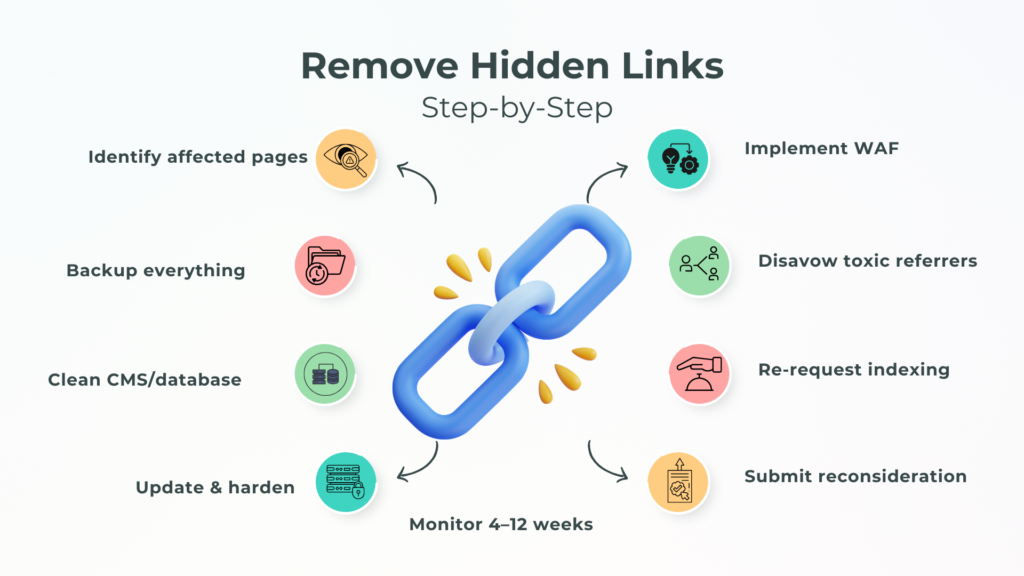
- Identify affected pages — Use crawl report or Search Console coverage to list URLs with issues.
- Backup everything — Full site + database before touching anything.
- Remove malicious code — Manually edit files (theme, plugins) or database entries (wp_options, post_content).
- Clean CMS/database — Search & replace tools (Better Search Replace plugin) for injected strings.
- Update & harden — Latest WordPress core, themes, plugins; delete nulled/inactive ones; strong passwords.
- Implement WAF — Cloudflare or Sucuri firewall rules to block bad bots/IPs.
- Disavow toxic referrers — If patterns persist (Google often ignores obvious spam automatically).
- Re-request indexing — GSC URL Inspection for cleaned pages.
- Submit reconsideration — If manual action; explain cleanup steps clearly.
- Monitor 4–12 weeks — Track recovery in GSC & rank trackers.
Hidden Links vs Legitimate UX Techniques
Not all hidden elements are bad:
- Accessibility: screen-reader-only text (sr-only class) for labels is fine.
- Navigation: off-canvas menus or tabbed content that hides visually but remains accessible.
- Progressive disclosure: content hidden until interaction (accordions, modals).
Google distinguishes intent: legitimate UX vs manipulation. If it helps users and follows WCAG, it’s usually safe.
Best Practices to Stay Compliant
- Ethical link building only (guest posts, niche edits, earned mentions)
- Full transparency (rel=”sponsored” when paid)
- Regular technical audits (monthly crawls + security scans)
- Secure hosting (managed WP hosts, auto-updates, WAF)
- Strong passwords & 2FA everywhere
- Monitor Search Console weekly
Common Mistakes to Avoid
- Buying cheap backlinks from unknown sources (often hidden/injected)
- Ignoring hacked alerts or slow traffic drops
- Using outdated black-hat tactics (still sold on forums)
- Not checking Search Console for manual actions
- Skipping security plugins on WordPress sites
Conclusion
Hidden links are one of the fastest ways to destroy hard-earned SEO progress—whether intentional black-hat or malicious injection. In 2026 Google catches them quicker and punishes harder. The fix is possible but painful; prevention is straightforward: secure your site, audit regularly, and build links transparently.
Don’t wait for a drop. Run a technical audit today—start with page source and a security scan. If you want a second set of eyes, send your domain to Brimcove.com/contact. We’ll check for hidden links, unnatural patterns, or security gaps and give you a clear fix plan. Proactive beats reactive every time.
FAQs: Hidden Links in SEO 2026
What is a hidden link in SEO?
A hidden link is a hyperlink invisible to users (via CSS hiding, tiny font, off-screen positioning, color tricks) but readable by search crawlers—typically used for manipulation or injected by hackers.
Are hidden links illegal?
Not illegal in a criminal sense, but they violate Google’s spam policies when manipulative. Intentional use can lead to penalties; hacked injections are a security issue, not a legal one for the owner.
Does Google penalize hidden links?
Yes—frequently. Hidden text and links are explicitly against spam rules. Expect algorithmic devaluation or manual actions (“hidden text and links”) if patterns are detected.
What is the difference between hidden text and hidden links?
Hidden text hides keyword-stuffed content for ranking manipulation. Hidden links specifically conceal tags to pass equity or spam silently. Both are penalized under the same policy.
How can I check if my website has hidden links?
View page source and search “href=”, use dev tools for display:none/visibility:hidden/off-screen CSS, crawl with Screaming Frog/Sitebulb, check Ahrefs for odd outbound spikes, run Wordfence/Sucuri scans.
Can hidden links appear after a hack?
Yes—very common. Hackers inject spam links (pharma, gambling, adult) hidden via CSS or JS to exploit your authority without you noticing until rankings drop.
Are hidden navigation elements bad for SEO?
Not if legitimate (e.g., mobile menus, accordions, screen-reader text). Google distinguishes user-focused UX from manipulative hiding. Accessibility-compliant hidden elements are usually safe.
How do I fix a penalty caused by hidden links?
Identify/remove all hidden code, clean CMS/database, update/secure everything, implement WAF, disavow toxic domains if needed, resubmit reconsideration request in Search Console with detailed cleanup explanation. Recovery takes 4–12 weeks.
